Three Ways to Add Long-Term Memory to an AI App

LLMs have no long-term memory of their own: the model keeps nothing between requests, so your application has to save what matters and send the relevant part back. You can build that in three ways: save structured records and look them up, build your own retrieval layer, or use a managed memory API.
This guide explains what LLM memory is, why long-term memory matters and what makes it good, then walks through each option, with code for the managed one. Whichever you pick, test it with the same acceptance sequence at the end.
What is LLM memory?
LLM memory is anything that lets a language model use information that isn't in the current prompt. There are three kinds, and only one of them lasts across sessions in a form you control.
| Kind | Where it lives | How it changes | Example |
|---|---|---|---|
| Parametric memory | The model's weights | Only through training or fine-tuning | General knowledge about Postgres |
| Context window (short-term) | The current request | Every call, and it's gone afterwards | This conversation so far |
| Long-term memory | Storage outside the model | Your app writes, updates and deletes it | "Prefers Python. Chose Postgres for reporting." |
The research uses the same split. The original retrieval-augmented generation paper describes models that combine parametric memory, the pretrained model, with non-parametric memory, a searchable index (Lewis et al., 2020). The CoALA framework divides an agent's memory into short-term working memory and long-term episodic, semantic and procedural memory (Sumers et al., 2023).
The model APIs are stateless. Anthropic's Messages API needs the full conversation on every call (Anthropic), and OpenAI describes each text generation request as independent and stateless (OpenAI). Products add memory on top. Anthropic's memory tool, for example, lets Claude read and write memory files that your application stores and serves back in later conversations (Anthropic).
Why does an LLM need long-term memory?
Without it, the only way to keep continuity is to resend the whole history on every turn. That breaks down fast:
- The window fills. Long histories eventually exceed it, and before that, accuracy and recall degrade as the token count grows, which Anthropic calls context rot (Anthropic).
- Every turn costs more. Resent history is billed again each time. OpenAI notes that even when you chain responses with
previous_response_id, all earlier input tokens in the chain are billed as input (OpenAI). - Nothing is prioritized. The model spends attention on greetings while the allergy or the deadline sits somewhere in the middle.
- References break. "Last Friday's outage" means nothing unless last Friday is in the prompt.
- Users repeat themselves. Stable facts like "I prefer metric units" have to be restated in every new session.
The gap is measurable. LongMemEval, a benchmark of 500 questions about long chat histories, found that commercial chat assistants and long-context models showed a 30% accuracy drop when they had to remember information across sustained interactions (Wu et al., 2024).
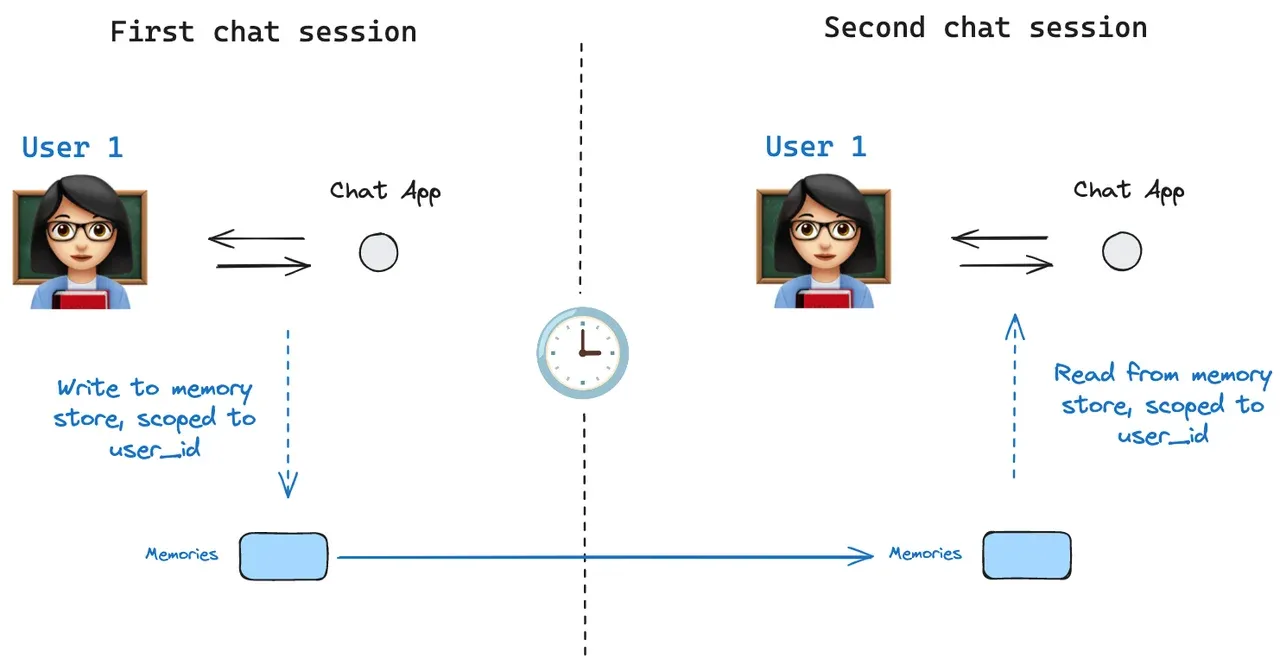
Long-term memory fixes this by keeping the facts outside the model and loading only the relevant ones:
What makes good long-term memory for an LLM?
Judge memory by what it puts in front of the model. It should be:
- Selective: it saves what a future task needs, not every message.
- Scoped: each memory belongs to a user (and often a project), so one user's memory never reaches another.
- Current: a correction replaces the old value for today's answers, while the history stays available when someone asks what was true before.
- Sourced: each memory points back to the message or document it came from.
- Findable by meaning: a question like "what do I like eating?" finds "I love olives on my pizza."
- Deletable: removing a fact removes it from every copy, including summaries and caches.
- Quiet when irrelevant: it doesn't inject every saved fact into every answer.
The context memory guide covers the architecture behind these properties: how memories are written, recalled, corrected and forgotten.
Option 1: Save structured records and retrieve them directly
For a small set of known facts, an ordinary database or versioned file can be enough. A user preference table can answer "what response format does this person prefer?" by user ID without semantic search.
Keep provenance and scope even in a simple implementation. A small schema for a returning user might look like this:
| Field | Example | Used for |
|---|---|---|
facts |
name: Zara, city: Lisbon | Grounding and rapport |
preferences |
metric units, short answers | Tone and format |
events |
2026-09-12: moved billing to Postgres | Questions about time |
sources |
message and document IDs | Checking and correcting |
Store authoritative account state separately: a remembered plan name should not decide access to a paid feature.
A JSON file per user is the simplest version of this. It's easy to read, diff and fix by hand, but it has no search, and it gets slow and awkward to migrate as users and fields grow.
This approach works well when the schema is predictable and lookup questions are narrow. It becomes less convenient when users ask open-ended questions across thousands of observations, or describe an old event without knowing its exact identifier.
The failure to watch is unbounded prompt loading. A simple store stays simple only while the app selects the records the task needs. Loading the entire history every turn moves the retrieval problem into the model's context window.
Option 2: Build a custom retrieval layer
A custom system can index documents and conversation records, combine keyword and semantic retrieval, and apply your own ranking. It gives you direct control over data contracts and query behavior. If you already run Postgres, the pgvector extension adds vector similarity search to it.
The work is more than an embedding call. Plan for ingestion status, version changes, tenant filters, replayed writes, retrieval failures, source citations, and deletion across derived records. If you add a graph for relationships (who decided what, which fact replaced which), it helps with timelines and explanations, and it adds extraction quality, entity resolution and edge updates to maintain. Each design forgets in its own way: plain records forget nuance, vectors forget order, and graphs forget whatever the schema didn't model.
Most agent frameworks already separate short-term state from a long-term store. Microsoft's Agent Framework, for example, has an in-memory history provider for conversation history and a file-backed memory provider that shares memory across sessions when you give it a stable scope, such as a user ID (Microsoft Learn). Our guides show the same split in LangGraph and CrewAI, with a memory API as the long-term store.
Use a narrow interface between the application and the retrieval implementation. For example, the application can ask for "authorized evidence for this user, task and time range" and get back source-linked records. That makes backend changes easier to contain, though it doesn't make different storage engines interchangeable without migration and testing.
Start with the RAG guide for a retrieval baseline. Add complexity only when it fixes a failure you've measured.
Option 3: Use a managed memory API
A managed service takes over ingestion, memory extraction, indexing and retrieval. Your application still owns authentication, business state, what it sends to the service, and what it does when retrieval is unavailable.
Here's the pattern with supermemory, following the quickstart. A namespace is the boundary, usually one per user. You save conversations under a stable ID, and in a later session you load the user's profile and the memories that match the new message:
import { Supermemory } from "supermemory" // npm i supermemory

const memory = new Supermemory({ apiKey: process.env.SUPERMEMORY_API_KEY })
const user = "user_4f8a" // one namespace per user

// Session 1: save the conversation under a stable id (one session, one document)
await memory.add(user, {
  content: [
    "user: I'm vegetarian, and I'm training for a half marathon in March.",
    "assistant: Got it. I'll keep both in mind.",
  ].join("\n"),
  id: "chat_2026_10_16",
})

// Session 2, days later: the profile plus the memories that match the new message
const { profile } = await memory.profile(user)
const related = await memory.search(user, {
  query: "What should I cook for dinner tonight?",
  searchMode: "memories",
  limit: 5,
})

const context = [
  ...profile.static.map((m) => m.memory),
  ...profile.dynamic.map((m) => m.memory),
  ...related.results.map((r) => r.memory).filter(Boolean),
].join("\n")
// Put `context` in the system prompt of your model call
Memories form in the background after you save, so a brand-new namespace can look empty at first. The Python SDK has the same calls (pip install supermemory). The user profiles docs explain the static and dynamic parts of a profile, and the product page covers how saved conversations become memories that get updated and forgotten.
Whatever service you consider, inspect the API boundary. Check whether it stores source documents, extracts facts, exposes profiles, supports correction and deletion, and returns enough provenance for your answers. Use the memory API comparison to evaluate options against the same workload.
Don't assume a managed service can attach to your existing vector backend unless a supported adapter says so. A hybrid application can keep its business database and use a separate memory service without the service adopting that database as its storage.
Compare the division of work
| Question | Saved records | Custom retrieval | Managed memory API |
|---|---|---|---|
| Who defines facts and scope? | Your application | Your application | Your application and documented service behavior |
| Who runs retrieval infrastructure? | Your database or file system | Your team | The provider, for its managed parts |
| How are corrections handled? | Your update rules | Your lifecycle logic | Service operations plus application rules |
| What must be evaluated? | Lookup and use of facts | Retrieval and lifecycle end to end | Returned evidence, lifecycle and integration failures |
| What can complicate migration? | Schema and accumulated state | Embeddings, indexes and derived records | Export fidelity, identifiers and provider-specific behavior |
Choose based on the behavior you need. A small application with strict historical queries can need more retrieval work than a larger one with simple preference lookup. For cost, the build-versus-buy guide and the operating-cost guide do the arithmetic, and our pricing page lists what the managed option costs.
Run the same acceptance sequence on each option
Use two fictional users and one project. Save a preference and a project decision for the first user, start a new conversation, and ask questions that need each. Repeat as the second user to test isolation.
Correct the decision, ask about both the current and the earlier state if your product needs history, then remove the test data. Introduce a failed write and a failed read, and check whether the application can tell "nothing remembered" apart from "memory unavailable."
Measure time to a supported answer, context tokens, ingestion cost and recurring maintenance.
Migrate one behavior at a time
Put the new read path behind a controlled rollout. Compare its evidence with the current path before letting it change customer-facing answers, and keep source identifiers so mismatches can be explained.
Avoid writing the same event through two independent extraction paths without a plan for duplicates. Double writes can create duplicate or conflicting memories even when both systems look healthy on their own.
The first release should make one recurring task easier: continue a conversation, respect a preference, or recover a prior decision. Once that survives correction, isolation and failure tests, widen the memory surface deliberately.
Common questions
Do LLMs have persistent memory across sessions?
Not on their own. The model keeps nothing between requests, and the APIs are stateless. Memory that persists lives outside the model, in your database or a memory service, and gets loaded back into the context window when it's needed.
Is a bigger context window a substitute for long-term memory?
No. A bigger window holds more of one session and nothing of the next. Filling it also makes recall worse, and you pay for every resent token. The LLM context window guide has the details.
Can I give a local LLM long-term memory?
Yes. Memory lives outside the model, so all three options work with a model you run yourself. supermemory also runs on your own machine as a single binary (npx supermemory local) and can use a local model through Ollama. Its telemetry is on by default and can be turned off (docs).
Is long-term memory the same as RAG?
They overlap. RAG retrieves passages from documents to answer a question. Memory decides what to keep from conversations, keeps it current and scopes it to a user. RAG vs agent memory covers when you need each.
To build the saved-records option from scratch, follow the Python agent memory tutorial. For a gentler introduction to the whole topic, read how AI memory actually works.