We're open sourcing the company brain. Here's how we designed the multiplayer harness
Company Brain is now open source. A walkthrough of the multiplayer harness behind its Slack experience, from proactivity and memory boundaries to approvals and recovery.
Version notice: this post describes the company-brain project as shipped, including its legacy
containerTagslayout. For a new integration, use namespaces with the current SDK and follow the v5 migration guide; the historical project description below is preserved.
It's been just two weeks since we discontinued the company brain harness. We had to offboard tons of people to other products, but many of our customers and others suggested we open source our work on the company brain. So, we have decided to open source it. You can use it here.
It's just one click to deploy on Cloudflare, and will take less than five minutes to set up. You'll own all the data.
In this blog, I wanted to talk through the architecture and some of the work we (mainly @maheshthedev, legend) did on the harness. It's honestly great engineering, built on top of Cloudflare Agents SDK, with many little cool things around permissioning, proactiveness, and more! Thanks @threepointone for Cloudflare Agents :)
As for why we shut it down, read our update. But the TL;DR is that we want to build the best memory system, and be the best in the world at it.
Unlike other blogs on X, this one is not gonna be AI slop, but kinda long because it's months of our work that I'll condense into simple architecture decisions that we made. I write these myself, so comment any feedback! This time, instead of boring you with words, this blog is full of diagrams and ASCII flows. Should be a fun read!
Designing a teammate, not a bot
When you think about a Slackbot, or an agent, only one thing comes to mind: "Send it a prompt, it will do the task, and reply with something."
We built the company brain around a different premise: instead of just getting the answer, it decides when to participate, gathers the right context, acts within the correct privacy boundaries, and can do extremely long-running tasks and sometimes just produce the most useful, smallest intervention.
The Company Brain harness is the runtime, policy layer, memory boundary, tool system, and conversation protocol surrounding the models. It turns raw model capability into the behavior of a dependable teammate: responsive when asked, selectively proactive, capable of investigation, quiet when appropriate, and recoverable when infrastructure fails.
The harness experience
A language model can classify a message, call a tool, or write a fluent answer. It does not inherently know: this is a multiplayer agent. So, there were a few things with multiplayer:
- Proactivity with Slack events (even huddles, notes, etc. should be learned from).
- Is the bot allowed to speak in the channel?
- If a memory container is safe to search.
- The right approval and access control policy. Approve before email send: yes or no? If you ask for too many approvals, that's bad too.
- Whether a newer message has replaced the current request (steering and other stuff around it).
- Whether a model-produced "working on it" is a final answer.
- How to recover if the runtime disappears halfway through a tool call.
- When silence is the correct outcome… when to shut up.
┌──────────────────────────────────────────────────────────────────────┐
│                     COMPANY BRAIN EXPERIENCE                         │
├──────────────────────────────────────────────────────────────────────┤
│ Slack UX                                                             │
│ mentions · DMs · threads · reactions · progress · approval cards       │
├──────────────────────────────────────────────────────────────────────┤
│ HARNESS                                                              │
│ routing · state · policy · memory scope · tools · concurrency          │
│ recovery · budgets · side effects · telemetry                         │
├──────────────────────────────────────────────────────────────────────┤
│ MODELS                                                               │
│ triage · main reasoning · classifiers · salvage · entity resolution   │
├──────────────────────────────────────────────────────────────────────┤
│ INFRASTRUCTURE                                                       │
│ Cloudflare · Postgres · AI Gateway · providers · connected apps        │
└──────────────────────────────────────────────────────────────────────┘
Our architecture
We built completely on Cloudflare, since the team has experience with it, it's the best DX for us and our agent, and scales really, really well. We also get a lot of features by using the Agents SDK out of the box.
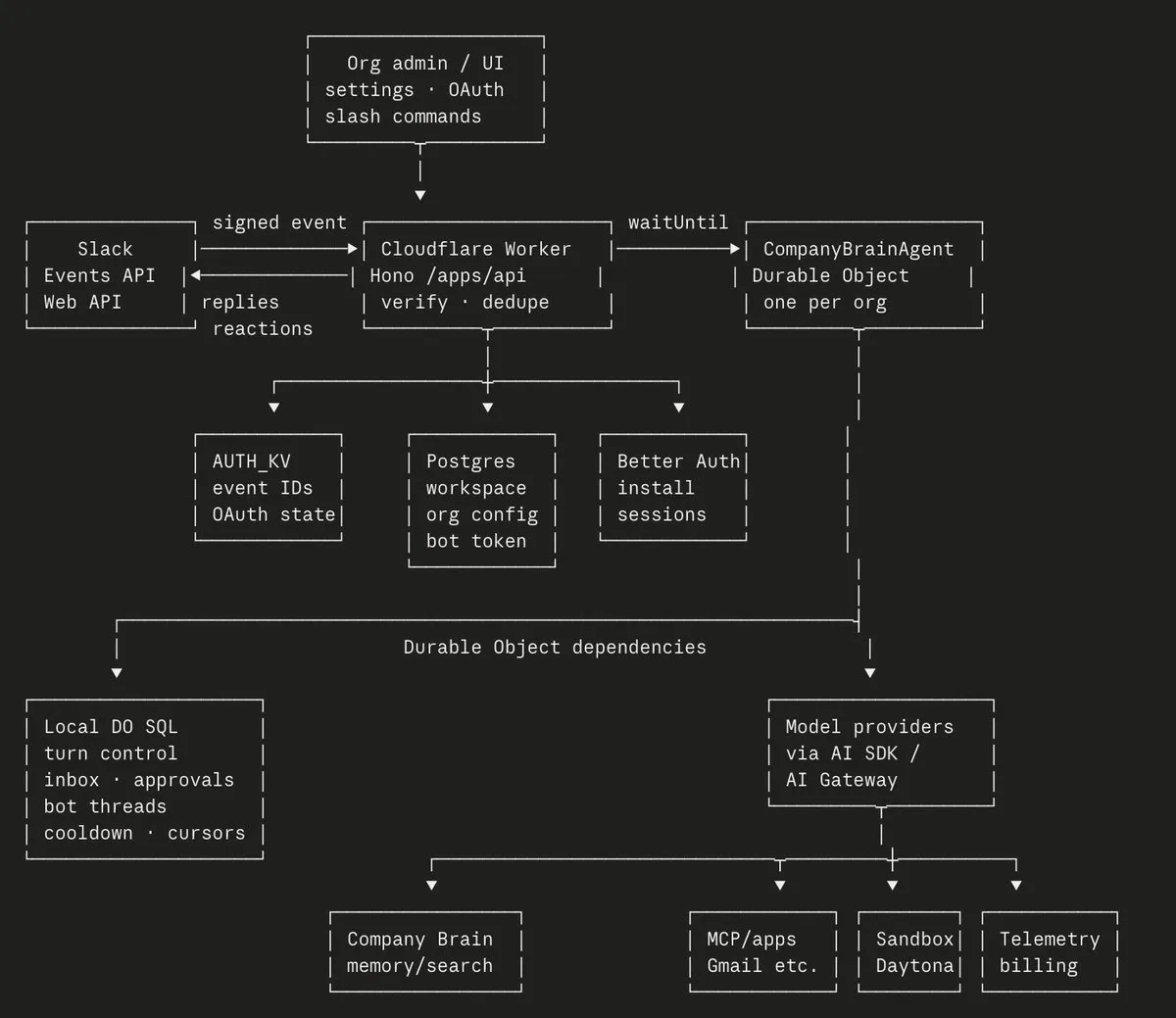
CompanyBrainAgent is the main thing, a Cloudflare Durable Object keyed by organization ID. It owns:
- Fiber-backed turn lifecycles and recovery checkpoints.
- Durable local SQL for active turns, inboxes, approvals, bot threads, cooldowns, rollout cursors, and traces.
- Slack API operations after decrypting the bot token.
- Triage, proactivity resolution, and action evaluation.
- The main model/tool loop.
- Approval suspension and resumption.
- Billing and telemetry scheduling.
OK, so we have this. Now, let's walk through what happens when an event comes in from Slack. An event may be:
- Explicit: an @mention, DM, assistant thread, or name wake.
- Passive: a top-level message in a channel where proactive participation is possible.
- Context-only: conversation that should be retained but not answered at the HTTP routing layer.
- Ignored: bot/self traffic, unsupported subtypes, or ineligible events.
Based on these events, we classify them:
Slack message
    │
    ├─ bot or self message? ──────────────────────────► DROP
    ├─ unsupported subtype? ─────────────────────────► DROP
    ├─ clearly addressed to another person? ─────────► CONTEXT / DROP
    ├─ membership or entitlement failure? ───────────► NOTICE or DROP
    ├─ emoji-only passive message? ──────────────────► DROP
    ├─ quiet channel and not explicit? ──────────────► DROP
    ├─ proactive cooldown unavailable? ──────────────► DROP
    └─ active turn already running? ─────────────────► STEERING GATE
                                                         │
                                                         ▼
                                                    TRIAGE ELIGIBLE
Talking only when needed
One of the things that we really cared about is the impactfulness of the bot. A lot of the agents we tried out in public were proactive, and they honestly should not be. It gets annoying quite fast! A proactive agent must answer two questions:
- Could the agent do something useful?
- Should it interrupt this conversation now?
We initially tried to make the proactivity based on a yes/no decision, but a lot of these things are not binary. It slowly switched to a confidence model based on various different thresholds that a small model decides.
                     MESSAGE + CONTEXT
                            │
                            ▼
              ┌──────────────────────────┐
              │ Triage model             │
              │ estimates the situation  │
              │                          │
              │ usefulness               │
              │ confidence               │
              │ urgency                  │
              │ noise                    │
              │ interruption cost        │
              │ investigation value      │
              │ reaction fit             │
              └────────────┬─────────────┘
                           │ 0–100 scores
                           ▼
              ┌──────────────────────────┐
              │ Deterministic evaluator  │
              │ formulas + mode policy   │
              │ explicit-message rules   │
              └────────────┬─────────────┘
                           │
          ┌────────────────┼────────────────┬────────────────┐
          ▼                ▼                ▼                ▼
       ANSWER         INVESTIGATE      ACKNOWLEDGE         PASS
    full turn          tool check        reaction         silence
This lets the evaluator understand cases such as:
- Useful but low-confidence → investigate instead of answer.
- Socially appropriate but informationally empty → react.
- Urgent but disruptive → investigate under a stricter mode.
- Correct and useful but already answered → pass.
- Explicit and lightweight → acknowledge rather than launch a full turn.
The output to this is an action + reaction (like a Slack emoji):
Primary action: ANSWER | INVESTIGATE | PASS
Reaction:       allowlisted emoji | none
BTW, for emojis we made this cool thing: emoji-resolve. So that the agent can just use whatever emoji it needs to, the resolver resolves it. This also means that the bot can use custom emojis that the organization has, once it learns that they exist.
That allows four natural behaviors:
- Reply without reacting.
- React without replying.
- React and reply.
- Do nothing.
Configuration of proactivity
Despite this, sometimes you just don't want the agent to be proactive. We built a way for users to control this behavior per channel.
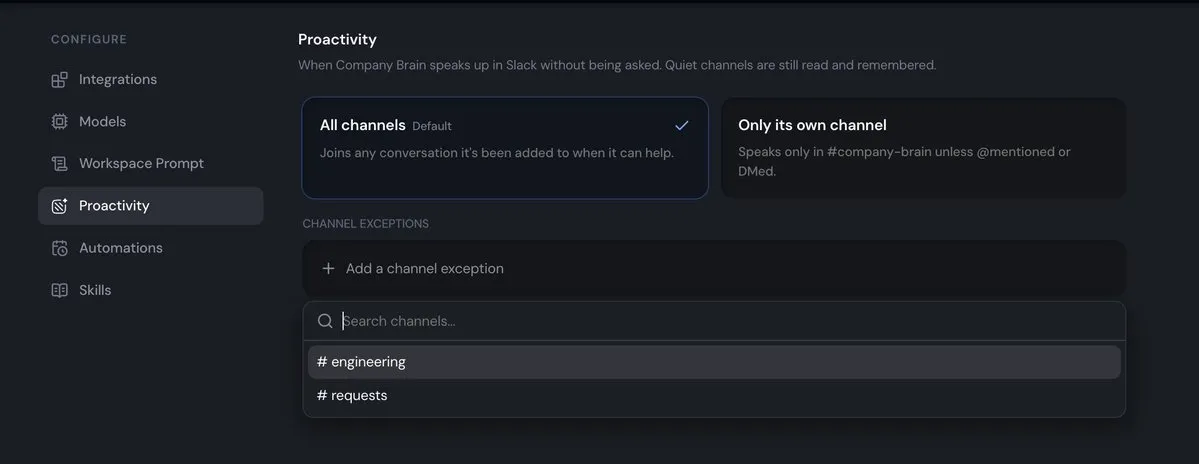
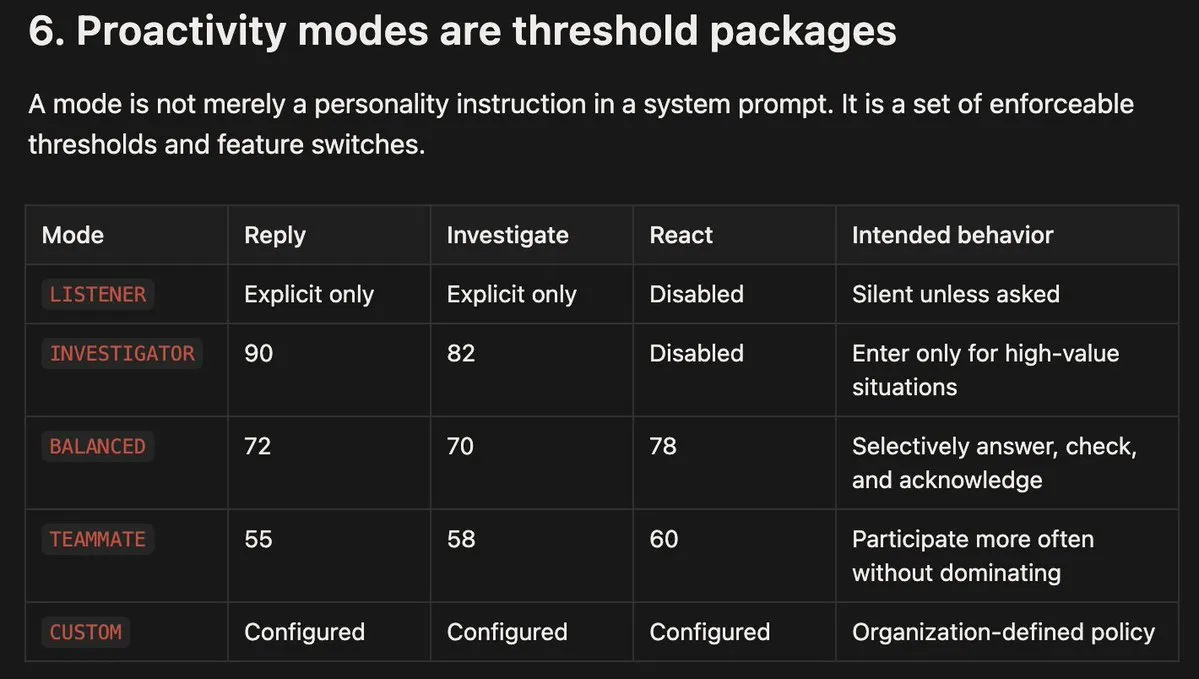
An explicit @ tag is pretty much always set to answer.
Explicit message
      │
      ▼
Triage model
      │
      ├─ ACK ───────────────► allowlisted reaction
      ├─ ANSWER ────────────► full turn
      ├─ INVESTIGATE ───────► full turn with investigation framing
      ├─ PASS ──────────────► coerced to ANSWER
      └─ error / bad parse ─► fallback ANSWER
Doing the answering
When triage selects ANSWER or INVESTIGATE, we gotta start working on the actual answer. And here's where the actual harness comes in: a phased state machine, with awareness of time, etc., so that it can try to do the work in a certain way within expectations of the human.
┌────────────────────────────────────────────────────────────────────┐
│                         computeTurn                                │
├────────────────────────────────────────────────────────────────────┤
│ A. TOOL ASSEMBLY                                                   │
│    assemble tool set · determine active tools                      │
│                            │                                       │
│ B. CONTEXT LOADING                                                 │
│    workspace prompt · company context · memory profile             │
│    thread history · actor · directory · attachments                │
│                            │                                       │
│ C. MODEL GENERATION                                                │
│    runModelLoop · streamed text · tool calls · live updates         │
│                            │                                       │
│ D. PROGRESS CHECK                                                  │
│    final answer or merely “working on it”?                          │
│                            │                                       │
│ E. SALVAGE                                                         │
│    one tool-free pass if only progress text exists                 │
│                            │                                       │
│ F. APPROVAL HANDSHAKE                                              │
│    consequential action? → checkpoint and suspend                  │
│                            │                                       │
│ G. FINALIZATION                                                    │
│    inbox empty? claim current revision; otherwise continue         │
│                            │                                       │
│ H. COMPLETION                                                      │
│    publish · write memory · charge · telemetry · reflect           │
└────────────────────────────────────────────────────────────────────┘
The model will continue to update the humans on the work: "I found xyz. Next step, I'll work on abc."
This is just so that the human doesn't think the agent is stuck or something. We used AI SDK's streaming, and had a few pacing nudges that we inject using the onBeforeStep hooks.
runModelLoop
    │
    ├─ streamText({
    │    model: main profile,
    │    system: policies + workspace context,
    │    messages: conversation + turn state,
    │    tools: assembled ToolSet,
    │    activeTools: currently visible names,
    │    stopWhen: step budget reached,
    │    abortSignal: turn control
    │  })
    │
    └─ EACH STEP
         │
         ├─ onBeforeStep
         │    ├─ drain live thread inbox
         │    └─ send pacing/progress nudge if needed
         │
         ├─ prepareStep
         │    ├─ render latest turn state
         │    └─ hide tools during forced wrap-up
         │
         ├─ model output
         │    ├─ text
         │    ├─ tool calls
         │    └─ text + tool calls
         │
         ├─ execute tools and append results
         ├─ record generated step
         ├─ at limit − 3: warn about remaining budget
         └─ at limit − 1: remove tools and force final text
The step budget is an active control mechanism. Near the end, the harness tells the model how many steps remain. At the final boundary, it removes tool access so the model must synthesize an answer from what it already has. This prevents a common failure mode where an agent spends its final step launching one more search and never actually answers.
Tool assembly, progressive disclosure, and codemode
The model can access several classes of tools, but not all schemas need to be visible at once.
                         assembleTurnTools
                                │
     ┌──────────────┬───────────┼──────────────┬──────────────┐
     ▼              ▼           ▼              ▼              ▼
┌──────────┐  ┌───────────┐ ┌───────────┐ ┌───────────┐ ┌───────────┐
│ Memory   │  │ Discovery │ │ Live apps │ │ Slack I/O │ │ Effects   │
│ search   │  │ people    │ │ Gmail     │ │ channel   │ │ save      │
│ inspect  │  │ entities  │ │ GitHub    │ │ search    │ │ connect   │
│ resolve  │  │ org tree  │ │ Linear    │ │ progress  │ │ forget    │
└──────────┘  └───────────┘ │ Notion    │ └───────────┘ └───────────┘
                            └───────────┘
                                  │
                                  ▼
                         ┌─────────────────┐
                         │ Lazy families   │
                         │ sandbox         │
                         │ scheduler       │
                         │ hidden until    │
                         │ enable_tools    │
                         └─────────────────┘
We used codemode and an activeTools selector to do that. activeTools controls which names are available at each step. Sandbox and scheduler schemas are hidden until the model explicitly unlocks those families. This provides three benefits:
- Lower context overhead: fewer schemas consume prompt space.
- Better tool selection: irrelevant tools do not compete for attention.
- Policy control: some capabilities only appear after an intentional transition.
The harness can also remove all tools during final wrap-up without rebuilding the entire model context.
Memory in a multiplayer setup
This was a bit tricky. Typically, a lot of the company brain startups are just ingesting everything into the vector store. We think that approach increases stale info and confuses the model a lot. We wanted to make sure there's a clear boundary between durable org knowledge and live operational state.
                 ┌────────────────────────┐
                 │       Agent turn       │
                 └───────────┬────────────┘
                             │
             ┌───────────────┴────────────────┐
             ▼                                ▼
┌────────────────────────┐       ┌────────────────────────┐
│ Company Brain memory   │       │ Connected applications │
│ decisions              │       │ current issue status   │
│ ownership              │       │ latest email           │
│ project context        │       │ live deployment        │
│ historical knowledge   │       │ recent Slack messages  │
└────────────────────────┘       └────────────────────────┘
        durable / semantic                live / transactional
A turn may start with memory to understand what "the migration" refers to, then query Linear or GitHub to verify the current status. Treating these sources as interchangeable would either make memory too volatile or live tools too context-poor.
As for the memory hierarchy, instead of everything being user-specific memory, we decided to take the channel-based approach.
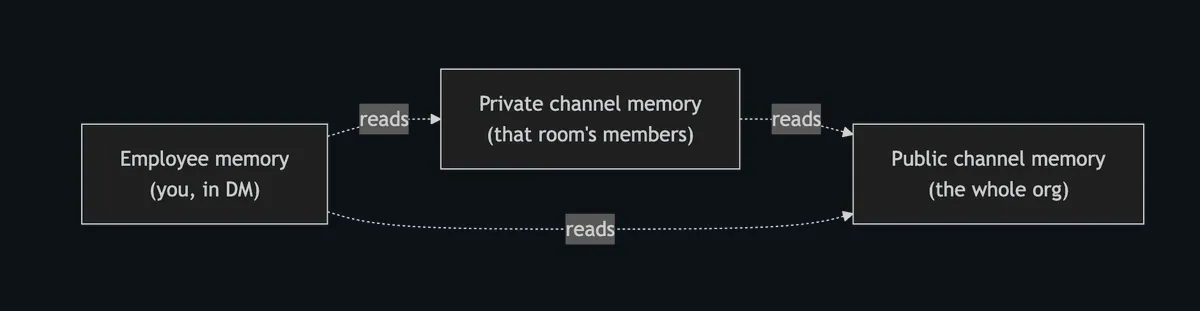
Inside Supermemory, the containerTags were arranged somewhat like this:
Public channel              sm_org_shared
Direct message              user_{userId}
Private channel or group DM slack_channel_{channelId}
Supermemory was all we needed to do memory, of course!
You need to know stuff before answering
One more interesting thing about our setup was that instead of just deciding whether or not to reply, the agent could decide to INVESTIGATE: investigate, and then decide whether you wanna talk.
INVESTIGATE
    │
    ▼
Gather evidence
memory · Slack · traces · connected apps
    │
    ▼
Is there something actionable or useful?
    │
    ├─ yes ─► synthesize and reply
    │
    └─ no ──► silentConclusion
              no Slack message
              release proactive slot
This is crucial for ambient intelligence. If every background check had to result in prose, the agent would pollute channels with messages like "I checked and found nothing." A silent conclusion lets the system optimize for useful outcomes rather than visible activity.
Approval flow for consequential tools
Model requests consequential tool
              │
              ▼
      Approval classifier
              │
      ┌───────┴────────┐
      ▼                ▼
 no approval       approval required
      │                │
 execute          store pending_approval
                       │
                       ▼
                checkpoint messages,
                tool state, and revision
                       │
                       ▼
                post Approve / Deny card
                       │
                 ┌─────┴─────┐
                 ▼           ▼
               Deny       Approve
                 │           │
              finish     resumeTurnAfterApproval
                             │
                             ▼
                      same model loop,
                      preserved context
Approval is not delegated to a separate agent. The current turn is suspended with a serializable resume state. If approved, the same reasoning process continues with the decision recorded. That preserves causality: the agent that proposed the action is the agent that sees the approval and completes the work.
Multiplayer and concurrency
Slack is not a request-response form. Threads continue while the agent works. A teammate can add evidence, correct a premise, replace the request, or ask the agent to stop. New messages entering an active thread go through an active-turn gate rather than normal triage.
When a new turn comes in, the small model decides whether to replace and supersede the original request, stop it, ignore the new message, or append and add context to the existing chain of thought.
New message arrives in active thread
                 │
                 ▼
       Active-turn gate model
                 │
    ┌────────────┼─────────────┬─────────────┐
    ▼            ▼             ▼             ▼
 IGNORE        APPEND        REPLACE       STOP
 unrelated     add context   supersede     cancel
                 │             request       │
                 ▼                          ▼
         durable inbox                abort signal
                 │
                 ▼
        drain before next step
                 │
                 ▼
    <live_thread_updates> injected
But that's too much complexity in a harness!
I know most of you would be thinking that's too much complexity in the harness, but it was needed. Here's why.
- Unlike Pi, OpenCode, Codex, etc. harnesses, we can't just YOLO and put everything in there. We needed determinism, because this would be an agent that would work in larger organizations. Permissioning, tool use, and a bunch of things are important. Also, we didn't want it to just be a question-answer thing; that's easy and boring. Making it truly multiplayer was a challenge.
- Product-specific things. We wanted to make sure that none of our users are scared of anything the agent could do that would be bad for the company. That's why we made sure that memory tool use, access control, and approval flow are something we have control over and can adjust based on our customers' needs.
- We were optimizing for different things. We weren't just concerned about response quality. For us, the larger objective was value provided as an employee.
              usefulness × correctness × timeliness
Agent value = ─────────────────────────────────────
                 noise × risk × interruption cost
A technically correct answer can still be a bad intervention if it arrives in the wrong channel, exposes private context, duplicates what a human already said, interrupts a sensitive discussion, or ignores a newer message. It gives the system a way to ask not only "What should I say?" but also:
- Should I say anything?
- Should I check first?
- Is a reaction enough?
- Which information boundary applies?
- Has the request changed?
- Do I need permission?
- Can I finish reliably?
That is the difference between placing a model inside Slack and building an AI teammate!
Bored you enough. Now, try it!
Everything I mentioned is open source, so you can try it, change it, hack it, give us feedback, whatever works :)
I also tried to make the onboarding super simple, so it should literally just be one-click deploy with the Deploy to Cloudflare button. Thanks for reading, follow for more!
Originally published by Dhravya Shah on X.