How AI memory actually works. A beginner's guide
How AI apps remember things between chats, why a bigger context window doesn't solve it, and the parts every memory system shares.
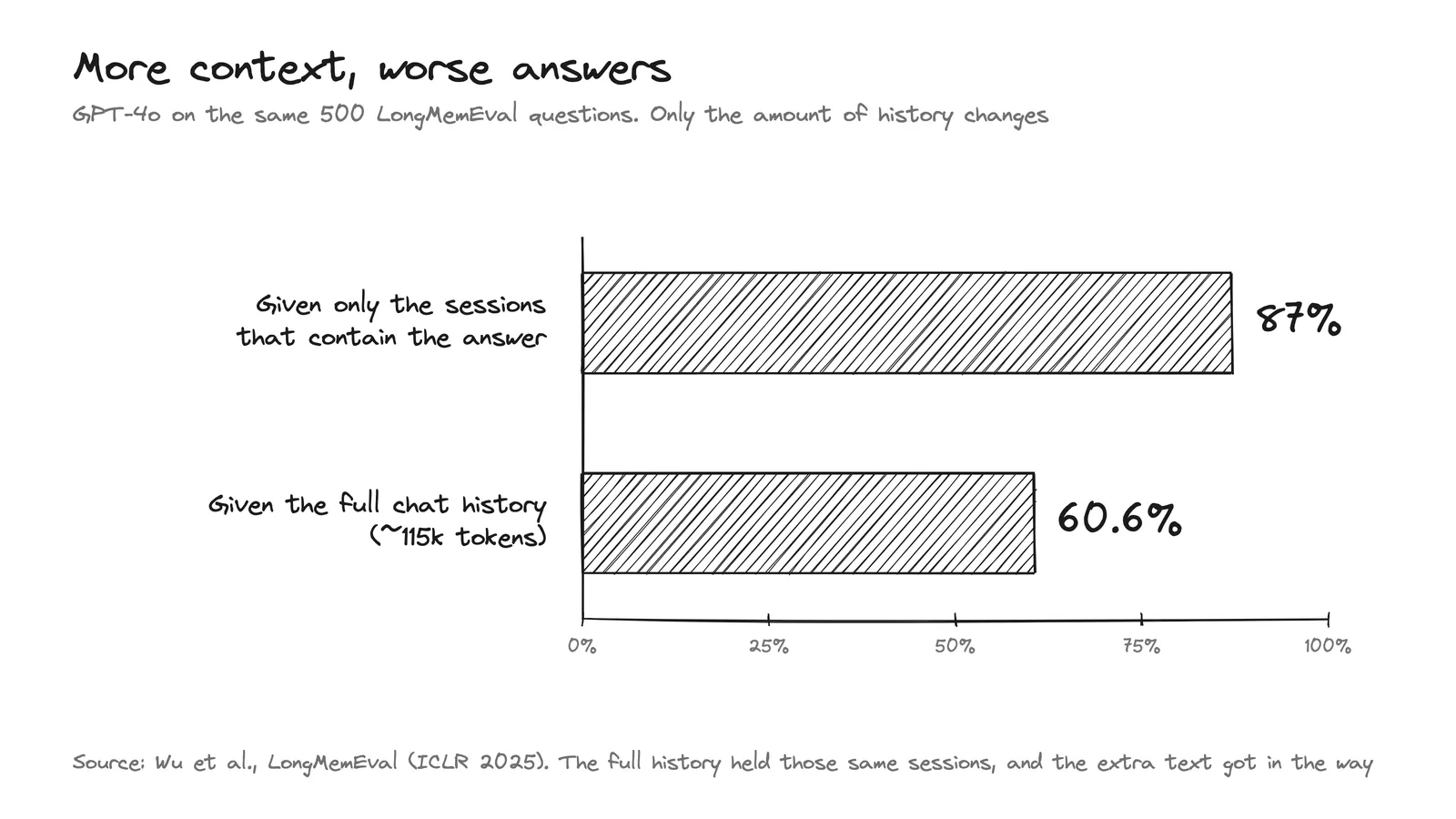
In one test, GPT-4o got 87% of questions right when it only saw the parts of a chat history that had the answer. When it saw the whole history, about 115k tokens, the same model got 60.6%.
That's from LongMemEval, a memory benchmark. The answer was in the chat both times. All the extra text just made it harder to find.
Models don't remember anything
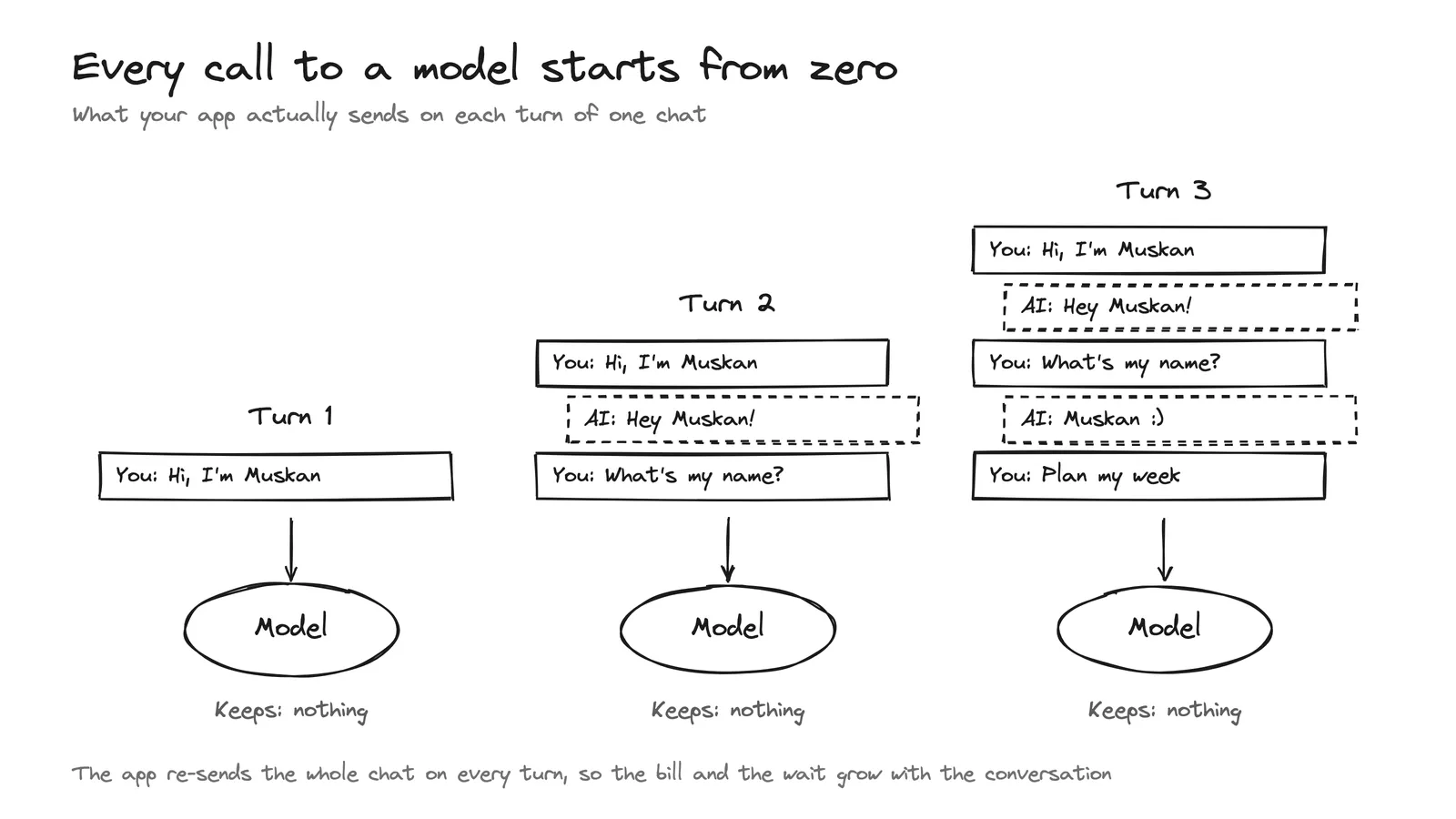
Anthropic's API docs say the API doesn't store your conversation, so your app sends the whole thing again on every turn. If you tell a chatbot your name and then ask for it, it only knows because your app sent the first message again.
A model does know things from training, but that knowledge stops at a cutoff date.
Everything else has to fit in the context window. That's the text the model can see in one call, and it's measured in tokens (a token is usually a word or part of a word). Claude's newest models can read about 1M tokens at once.
So any app that seems to remember you is keeping notes somewhere else and pasting the right ones back in.
Why not use a bigger window?
You'd think a 1M-token window would fix this. The test at the top already shows that fitting more into the window can make answers worse. Models also miss information buried in the middle of a long prompt (a 2023 study).
It's expensive too. A 100-turn chat is only about 50k tokens long, but every turn resends everything before it, so by the end your app has sent about 2.5M tokens.
To be fair, for short histories, putting everything in the prompt works well. Salesforce's ConvoMem benchmark found that sending the full history works best for the first 30 conversations and is still workable up to about 150. Past that, it gets slow and expensive, and the paper recommends search-based or hybrid setups instead.
Two ways to use raw data
Every memory system starts with raw data, like chats, documents and files. There are two basic ways to use it.
The first is to keep the raw data as it is and let the agent search it. The search can be as simple as grep, which looks for exact words. It can also be semantic search, which turns text into embeddings (lists of numbers based on meaning) and finds the closest matches. That's how "my flight got cancelled" can match "the airline scrapped my trip", even though they share almost no words. RAG (retrieval-augmented generation) is the classic version of this, where documents are split into chunks and the closest chunks get pasted into the prompt.
But raw text has no idea which fact is current, and the agent has to dig through all of it to find what it needs.
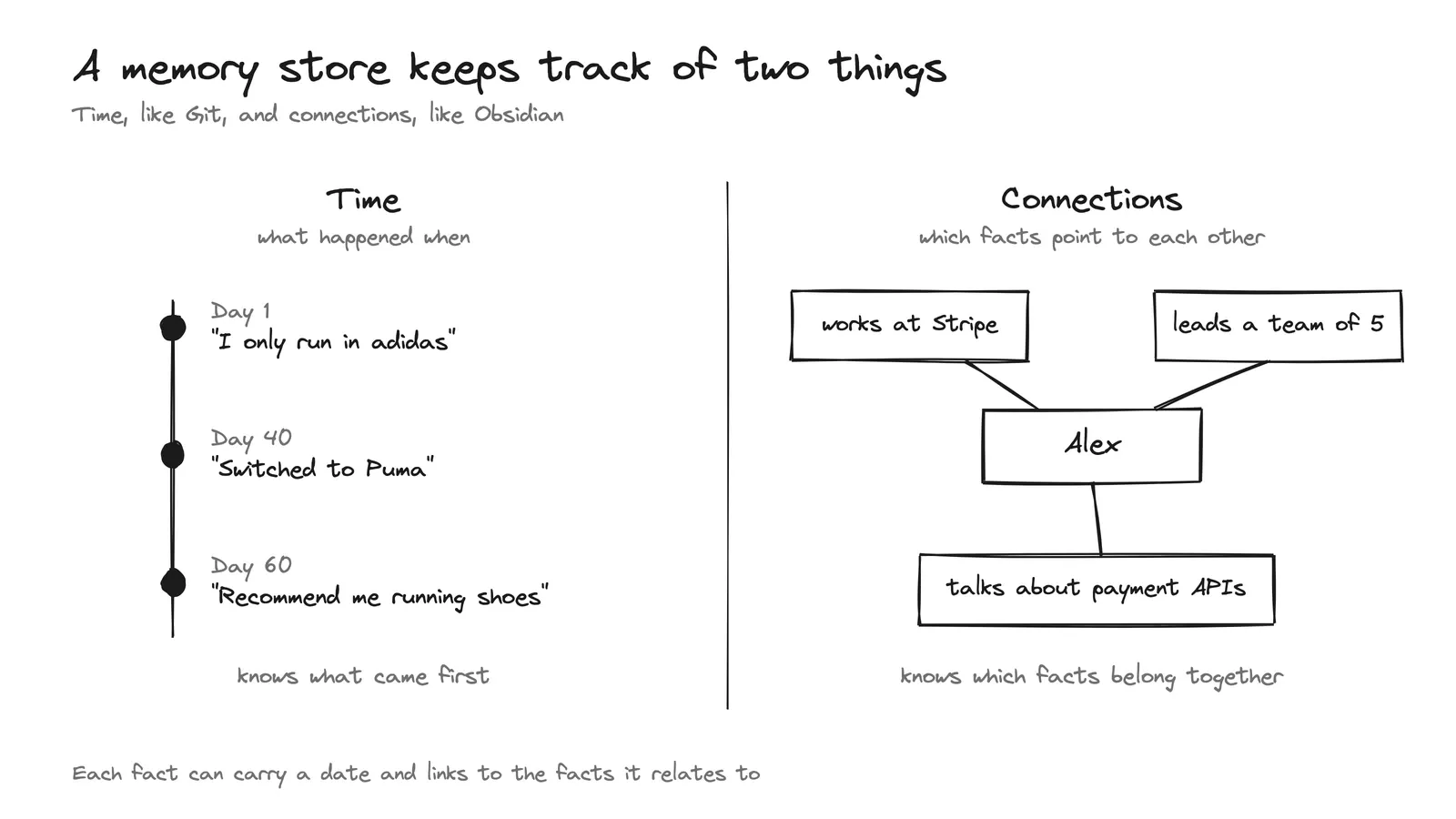
Say you tell an assistant on day 1 that you only run in adidas. On day 40 you say you switched to Puma and you're never going back. On day 60 you ask for running shoes. Search might still pull up the day 1 message, since it's a close match for a question about running shoes.
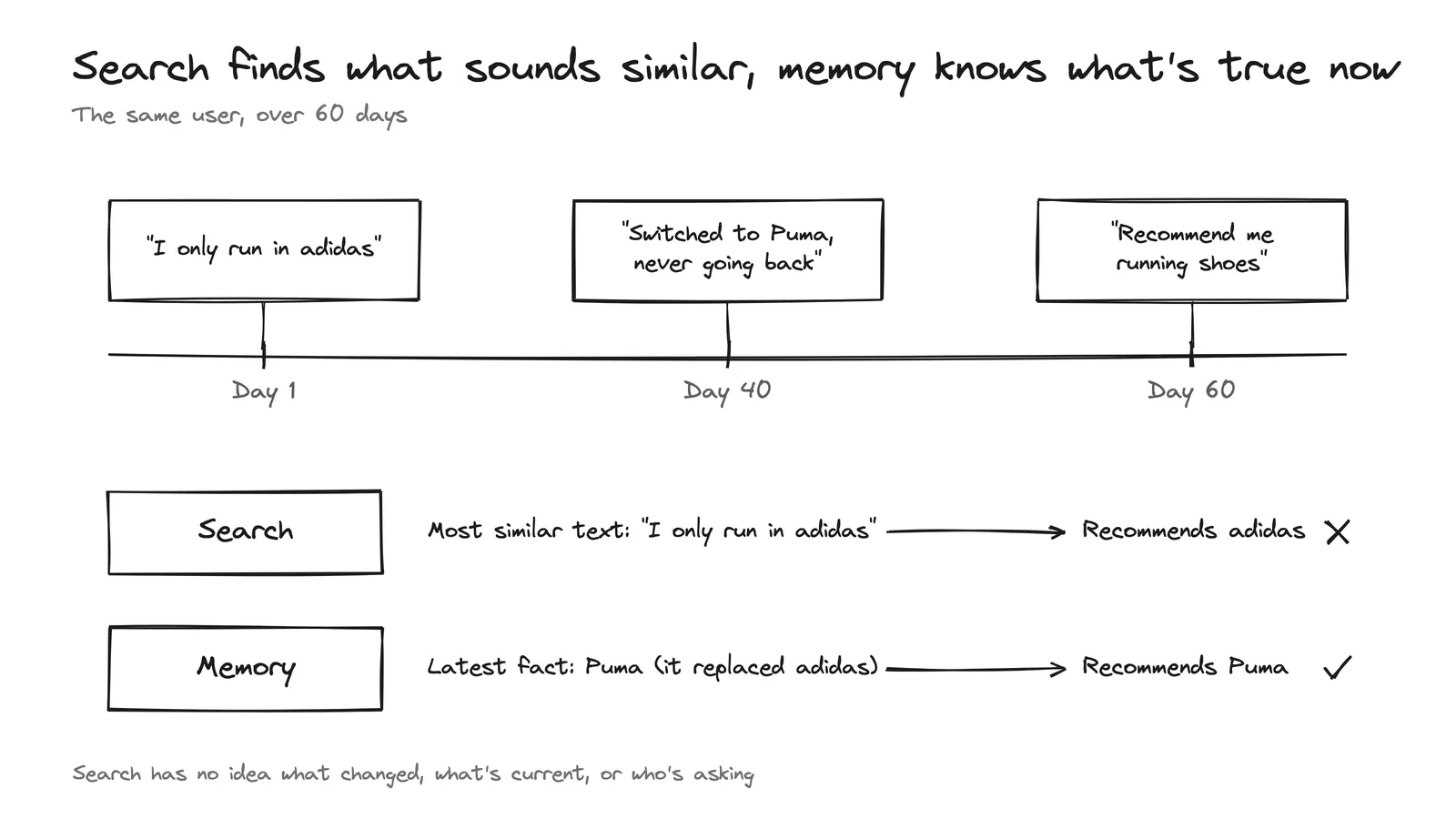
The second way is to put a model in front. The raw data goes through a model first, and the model rearranges it into something tidier, like notes, a wiki or a list of facts. That model can notice when a fact changes. The tradeoff is that everything now depends on what the model decides to keep, merge or drop.
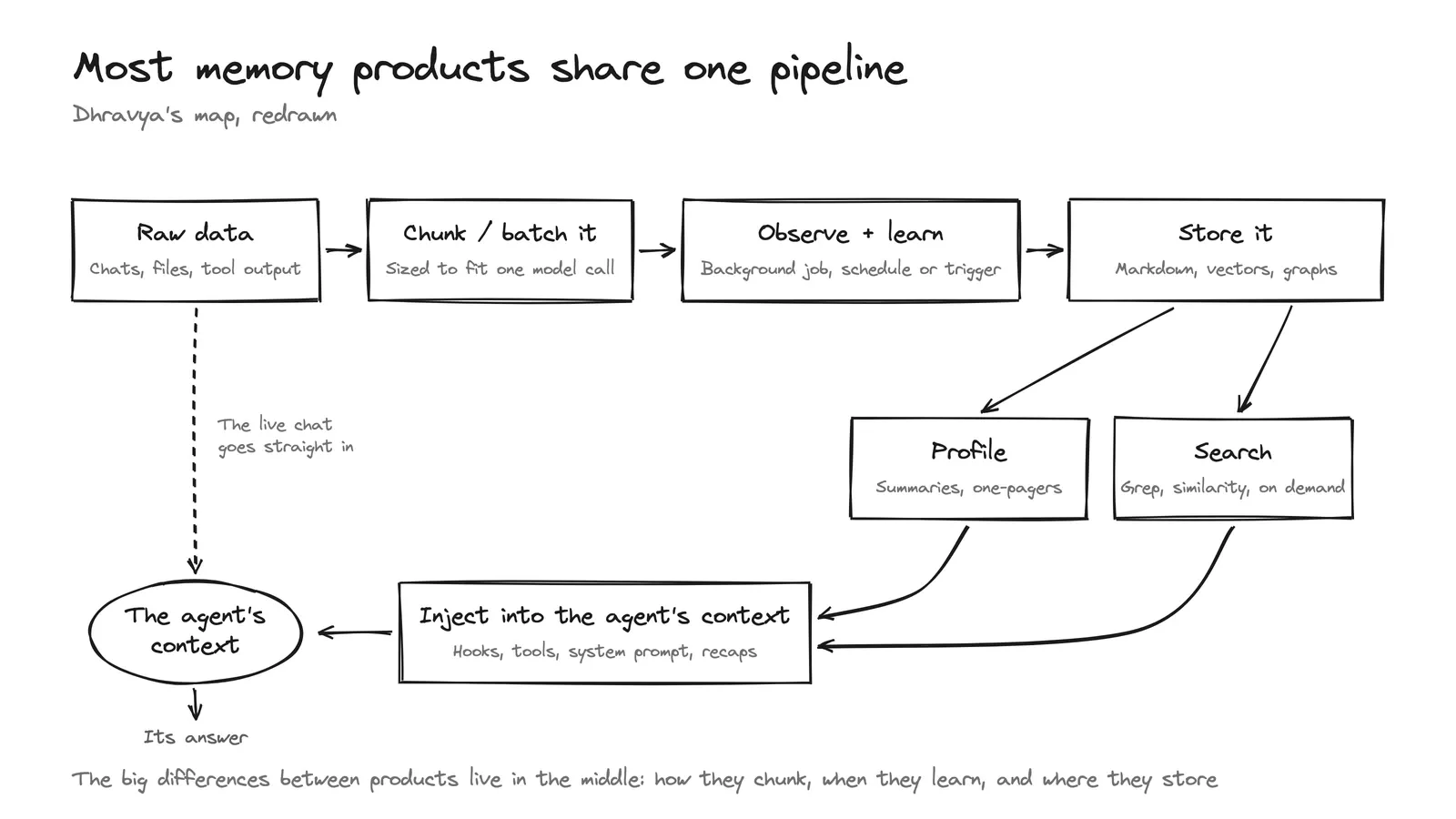
What every memory system has
Our founder, Dhravya Shah, wrote about what we found after studying the memory in ChatGPT, Claude, Instinct, OpenClaw, Hermes, Muse and others. Whether a system stores markdown files, a graph or a list of facts, they all share four parts.
- A search step. This can be RAG, grep or semantic search, and something always has to find the relevant pieces.
- Chunking. The data gets split into pieces, because it can't all fit into one model call. That goes for search and for learning.
- Learning outside the main conversation. The agent you're talking to usually isn't the one deciding what to remember. Learning runs on a schedule or after a trigger.
- Code in the app that puts what was found back into the model's context.
Underneath, two things are always there. One is a model that arranges the data, in the background or in real time. The other is a store that holds it.
Memory is a lifecycle
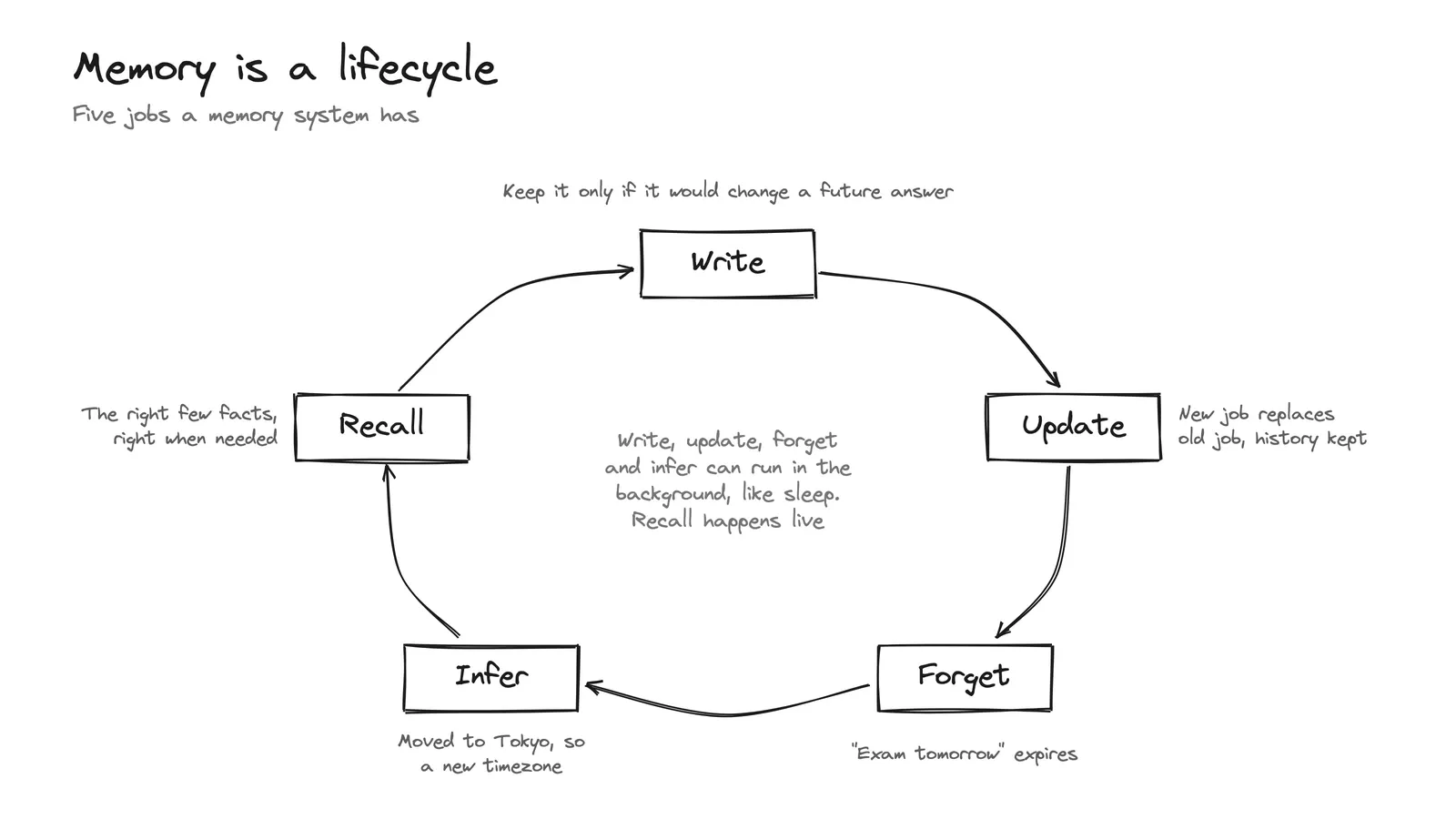
First, a memory system decides what to save. The test is whether a fact would change a future answer, so "I'm vegetarian" is worth keeping and "It's raining here" isn't.
Then it keeps facts up to date. If you mention a new job, the old one should stop showing up in answers. Some facts expire, too. "I have an exam tomorrow" is wrong three weeks later.
It can also work out things you never said. If you mention you just moved to Tokyo for work, it can guess your timezone changed too.
All of this can happen in the background, before anyone asks anything, so nobody waits on it. Pulling facts back out is the only part that happens live. When a message comes in, it finds the few facts that matter for it.
Time and connections
The store has two things to keep track of. One is time, and the other is connections.
Time is about what happened when. Git works this way. Every change is saved in order, so you can see what was true before and what's true now. Some memory systems use Git directly. Instinct, for example, keeps its memory in markdown files tracked by Git and searches them by keyword. Time tells you the Puma message came after the adidas one.
Connections are about which facts point to each other. Obsidian works this way. Notes link to other notes, and you can follow the links. If a memory knows that "Alex works at Stripe" and "Alex leads a team of 5" are about the same person, it can answer questions that neither fact answers alone. A link can also say that one fact replaced another, which time alone can't tell you.
Where memory plugs in
You can connect memory to an agent in two ways. One is to give the model a memory search tool and let it decide when to use it. That only works if the model notices it's missing something. The other is hooks, where the app fetches and saves memories at set moments without waiting for the model to ask.
How we do it at supermemory
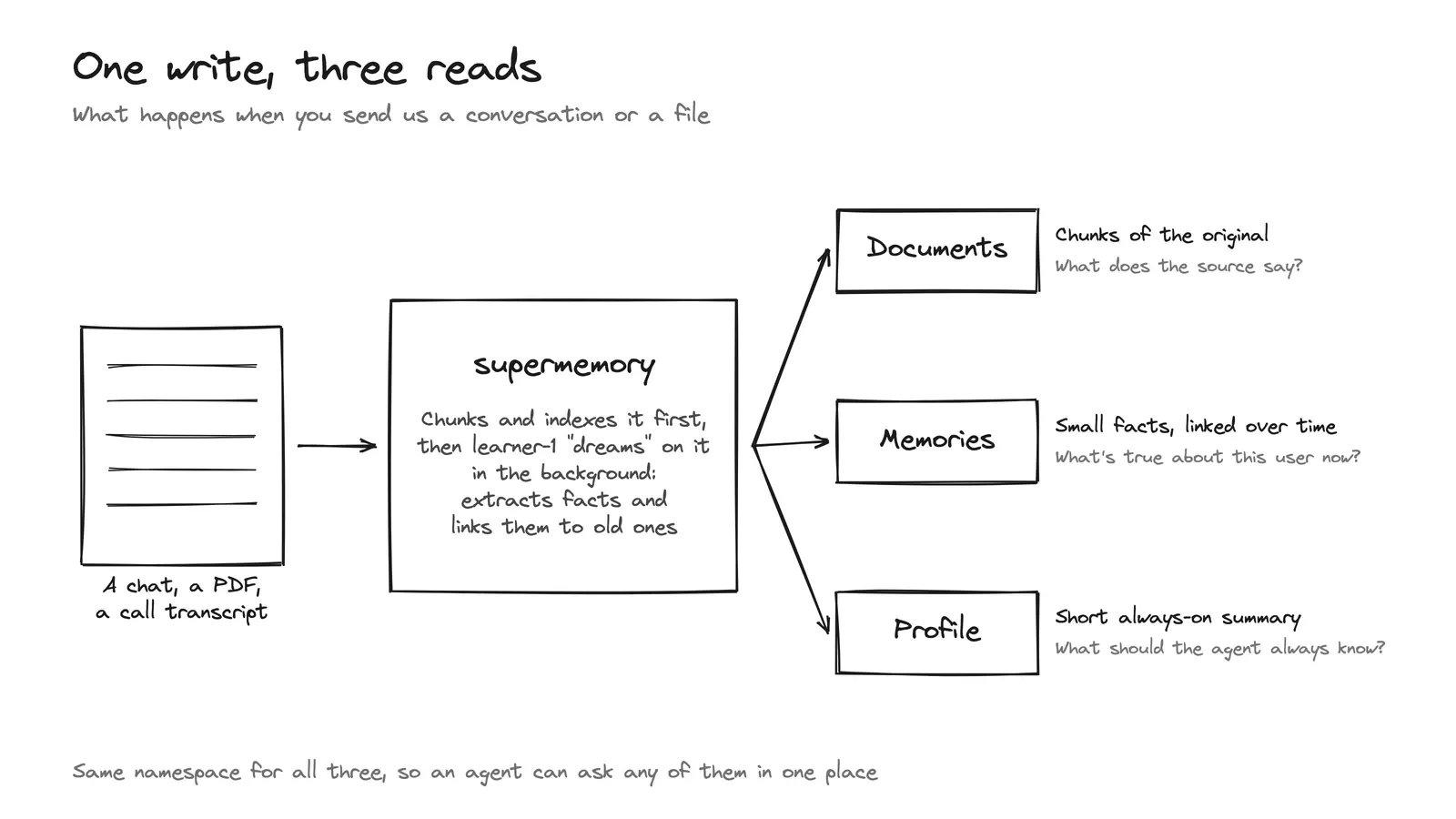
We do the arranging with learner-1, a model we built for the job. It reads what you send, pulls out facts and links them to the ones it already has. We call this dreaming, and OpenAI uses the same word for the background process behind ChatGPT's memory.
We never retrain your model. The memories go into its prompt, so this works with any model.
When you send us something, like a chat or a PDF, you can read it back three ways. Documents are chunks of the original, for when you want to know what the source said. Memories are the facts learner-1 pulled out, for what's true about someone right now. The profile is a short summary your agent should always have in front of it.
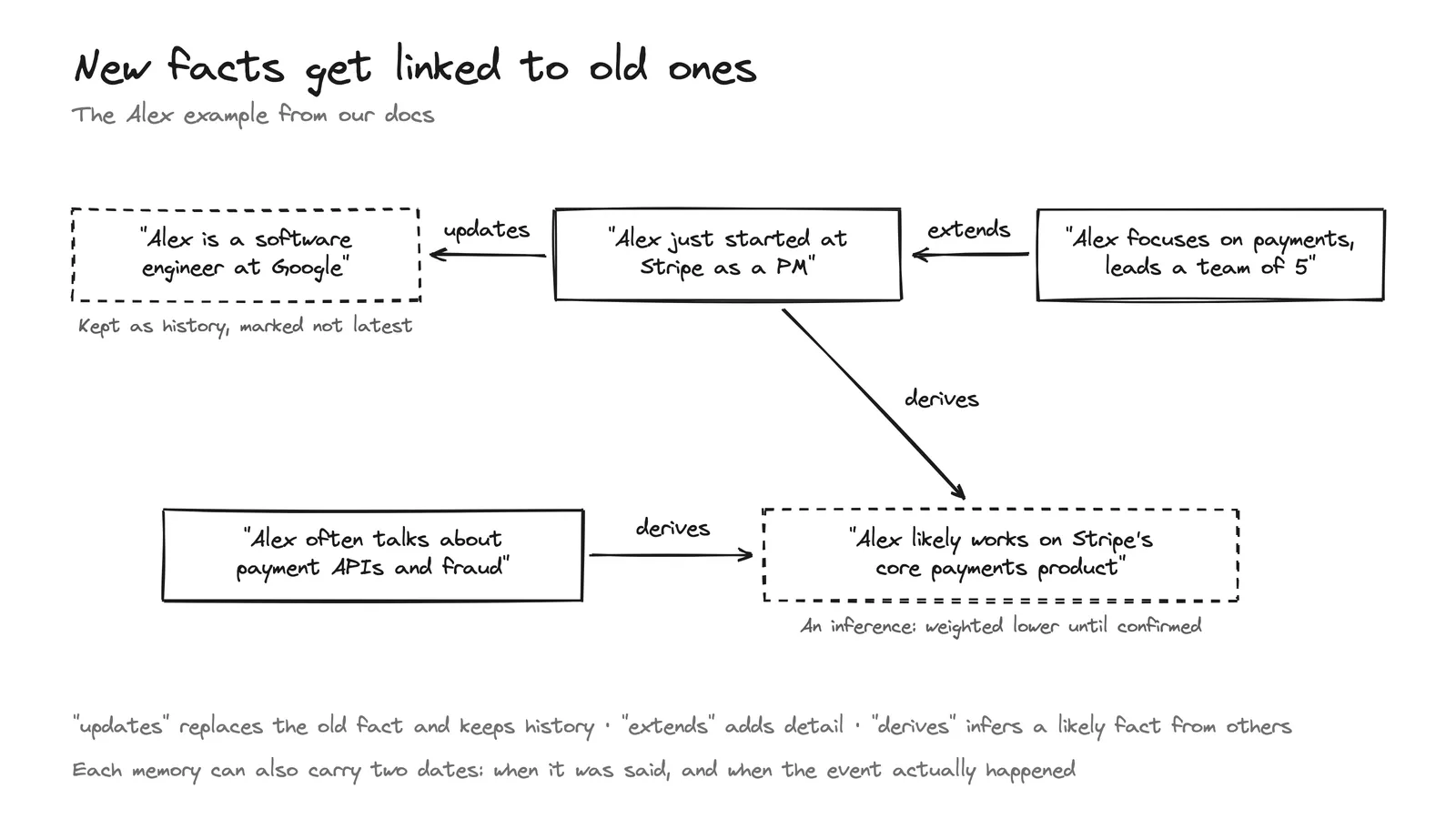
Our store keeps track of both time and connections. Each memory is one small fact instead of a whole file, and each fact points to the facts it relates to. Here's what that looks like for a user called Alex.
- Updates: "Alex just started at Stripe as a PM" replaces "Alex is a software engineer at Google". Search returns the new fact, and the old one is kept as history.
- Extends: "Alex focuses on payments, leads a team of 5" adds detail. Both facts stay true.
- Derives: from the Stripe fact and "Alex often talks about payment APIs and fraud", the system guesses that Alex works on Stripe's core payments product. It trusts that guess less until it's confirmed.
The updates link is what fixes the running shoes problem from earlier.
The profile holds long-term facts about you and what you've been up to lately. Search only has your message to go on, and "hey, what should I cook tonight?" says nothing about diet. The profile gets added whatever you ask, so the model still knows you're vegetarian.
Our Claude Code plugin uses hooks. It loads your profile when a session starts, searches memory with your prompt before Claude replies, and saves the new messages after each reply. Whenever it pulls memories into your prompt, you see a line like ◪ supermemory · recalled 5 memories (242 tok).
Our coding plugins also share one memory per repo. If you switch from Claude Code to Cursor halfway through a project, Cursor already knows the decisions you made.
How do you know it works?
LongMemEval-S, the version of LongMemEval we used, gives each of its 500 questions its own chat history of about 115k tokens to search. Our LongMemEval-S report by Soham Daga, Sreeram Sreedhar and Dhravya Shah measures how often our top 20 search results contain what's needed to answer the question. With aggregation on, a setting that can merge several related memories into one result, that happens for 97% of the questions, and for 100% of the questions where a fact changed partway through the chat.
That 97% measures search. The 60.6% at the top counts how many answers GPT-4o got right after reading the whole history, so the two numbers can't be compared directly. To get a right answer, a model still has to read the search results and write the reply, so the final score depends on that model too.
We open-sourced MemoryBench so anyone can run LongMemEval on supermemory, or on their own setup. Its default run fetches 10 results with aggregation off, so it's a different test from the one in our report.
Try it
Here's the whole thing in code, using our supermemory npm package. Use one namespace per user, project or repo, and memories stay inside it.
import { Supermemory } from "supermemory" // npm i supermemory

const client = new Supermemory({ apiKey: process.env.SUPERMEMORY_API_KEY })

// 1. Write: send a conversation. Facts get extracted and
//    linked in the background, which can take a few minutes.
await client.add("user_123", {
  content: "user: I just moved from Google to Stripe as a PM",
})

// 2. Recall: the profile, plus memories relevant to this question
const { profile } = await client.profile("user_123")
const { results } = await client.search("user_123", {
  query: "Suggest a talk I should give",
})

// 3. Inject: put it in the system prompt of any model
const context = [
  ...profile.static.map((m) => m.memory),
  ...profile.dynamic.map((m) => m.memory),
  ...results.map((r) => r.memory ?? r.chunk),
].filter(Boolean).join("\n")
If you're building an agent, get an API key or try our coding plugins.