OpenClaw Memory Problems: Why It Forgets and How to Fix It (2026)
OpenClaw remembers by writing Markdown files in its workspace, so it forgets anything the agent didn't save, and older daily notes stay out of the conversation unless they're searched for or promoted into MEMORY.md. The supermemory plugin fixes that with hooks that recall relevant memories before every turn and save the exchange after it. Install it with openclaw plugins install @supermemory/openclaw-supermemory, and like every supermemory coding agent plugin, it's free on every plan.
Updated October 16, 2026This post first ran on February 19, 2026. The setup, the pricing and the section on what OpenClaw's memory does today are current as of October 16, 2026, and the rest is the original post.
TLDR: Today, we are releasing a new version of our openclaw plugin - github.com/supermemoryai/openclaw-super….
This post is going to be a bit technical, so bear with me (or bookmark for later!)
In this post, I will talk about what we do about OpenClaw memory, and how we fix it.
BENCHMARKS AT THE END!!! :)
It's been about two weeks since @OpenClaw absolutely took over the internet. Everyone's been talking about it - the things it can do, how it can connect to all our tools, and how we can chat with it on our preferred messaging platform. This always-running, always working assistant.
It's biggest problem? Memory. It's not just me saying it. We launched our plugin a few weeks ago (it got 500k views!!), and it is much-loved!
just do an x search about openclaw memory. no one has good things to say about it :(x.com/pedrodias/status/2023013765911122…
x.com/DhravyaShah/status/20232589583711…
Openclaw obviously saw this - and they even added the QMD memory plugin. This should fix it, right???? ....Even today morning, I woke up to this post by @Levelsio - and I did my usual plug, talking about the @supermemory plug etc. etc.
And, to my surprise, MANY recommended supermemory. But why? What do we do differently that the built-in version does not? How is it different from filesystem? or QMD? How does it compare on the benchmarks?I kept getting these questions - so here's a practical, technical explanation of what supermemory does differently.
OpenClaw's memory problems
To understand this well, we first need to learn exactly how openclaw remembers things. This is how it worked in February 2026; what OpenClaw's memory does today covers what has changed since. It has a Two-layer storage:
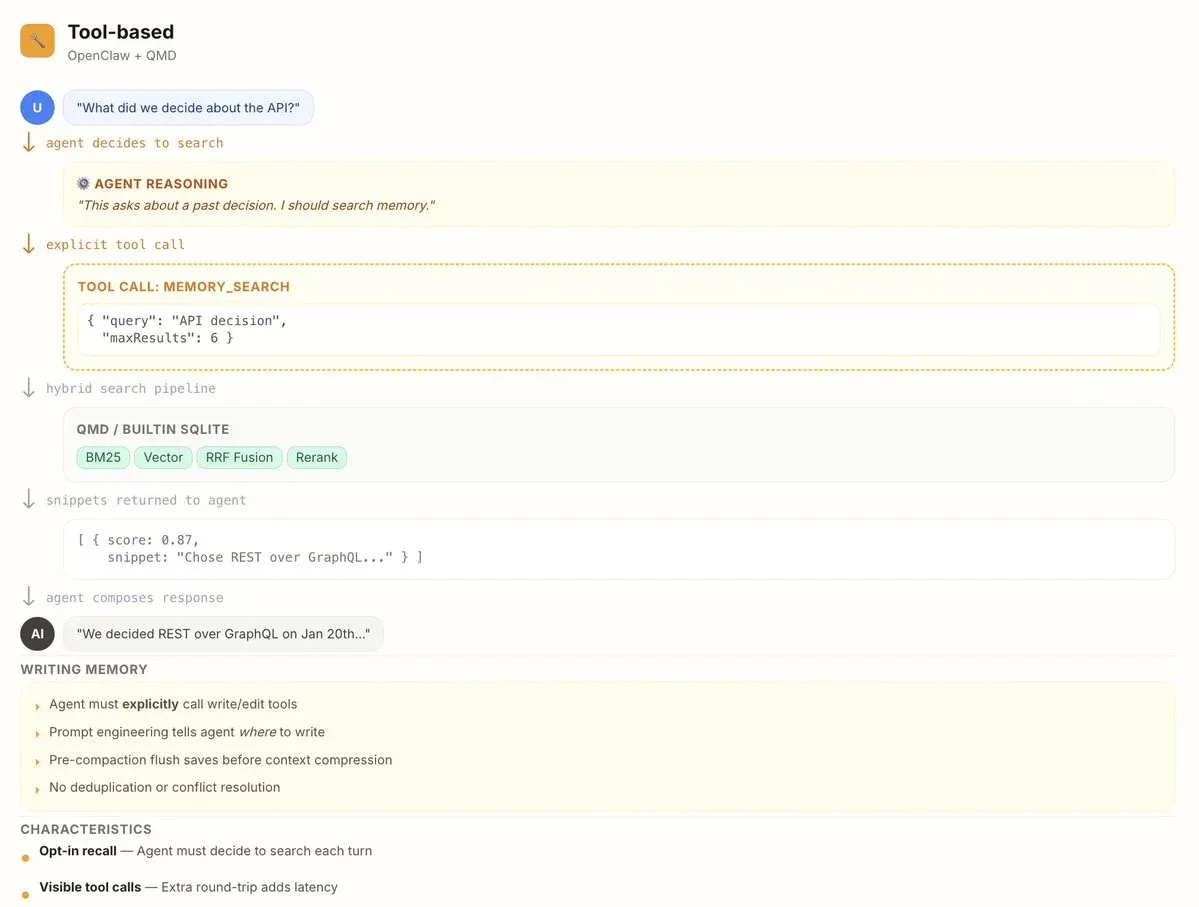
- memory/YYYY-MM-DD.md: daily append-only logs. The agent reads today + yesterday at session start. Think of it as a scratchpad for running context.
- MEMORY.md: curated long-term facts, preferences, decisions. Only loaded in private/DM sessions (never group chats, for privacy).
Two tools (read-side):
- memory_search: semantic search over all memory files. Returns snippets with file path, line range, and score. Mandatory before answering anything about prior work, decisions, dates, people, preferences. **
- memory_get: read specific lines from a file after finding them via search.
The problem?
- It uses tools, not hooks.
Because it is highly reliant on tools, you are always expecting the main agent to UTILIZE the tools to do any memory operation.
You tell OpenClaw your name? It has to spend tokens and time to save it, using a tool.
You ask it a basic question? you have to ask it to use the memory tool to actually collect the context to answer the question.
This approach is rather slow, but also context is only fetched when you need it. *The problem? Counterintuitively, this uses MORE, not LESS tokens - because the tool call etc are expensive too! - It does not handle knowledge updates, temporal reasoning, multi-session context well.
When saving new things to memory, it has no idea of what's already in there (Unless you explicitly ask it to traverse through the whole memory again). This leads to it being a bit stupid when adding things, as it will add redundant information, not "update" existing knowledge, and generally not build on top of everything it knows about you. - It does not forget. Forgetfulness is more important than you think. This is the primary way to keep the context fresh and useful, even after time has passed.
How supermemory fixes it
We have been building the context infrastructure for agent memory for years now. Throughout this time, we have learnt and built something that we think is ideal for the age of OpenClaw.
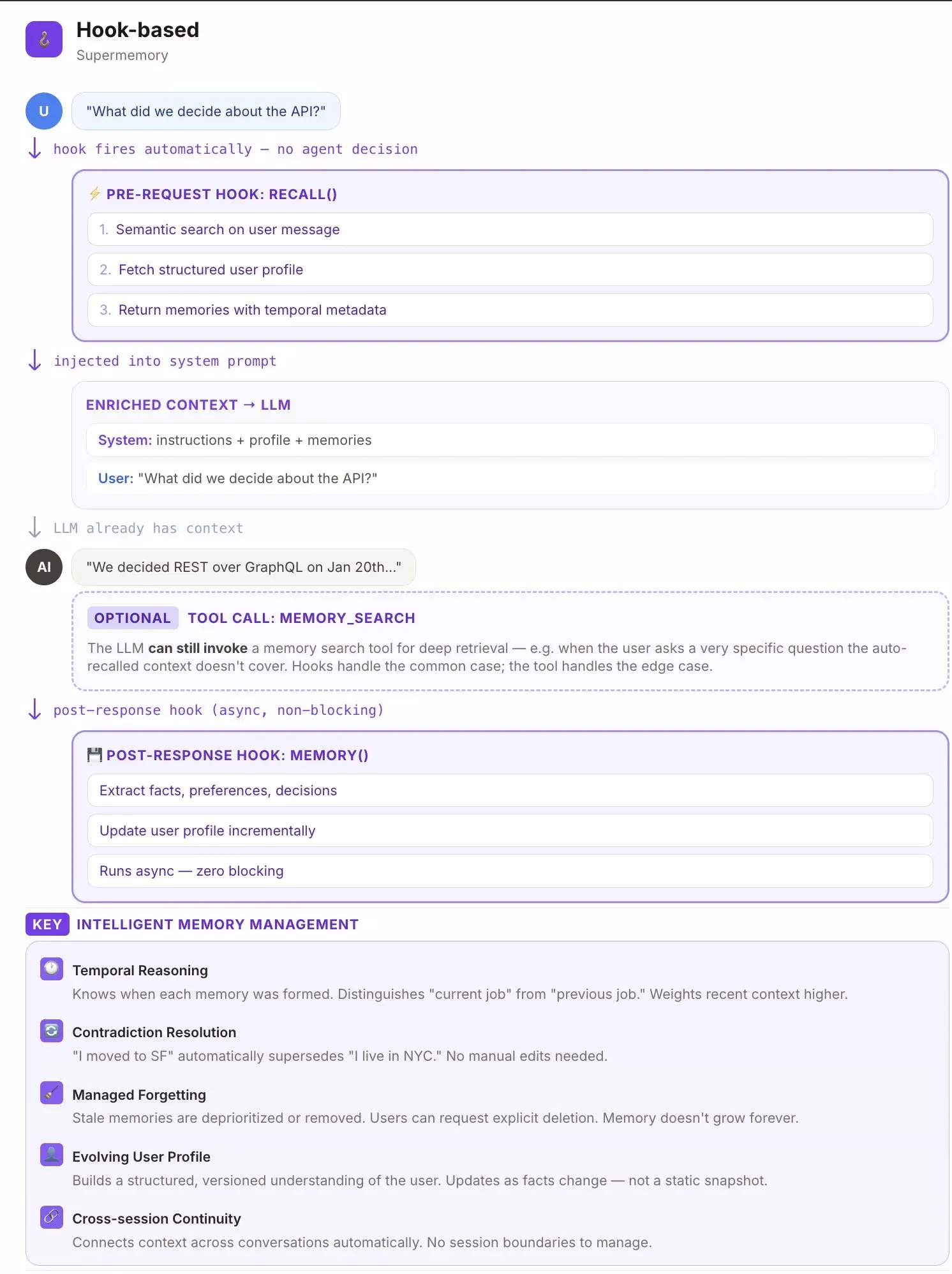
What's different? Supermemory is built with a vector-graph layer, which automatically learns and updates it's knowledge about users.
It comes with Knowledge updates, temporal reasoning, and other things. Every fact is built on top of other facts, and it's always contextual.
For the plugin, we make use of HOOKS. The saves happen implicitly, in the background, with both the memories extracted out of it, as well as the raw chunks being saved.
This is mainly because we don't know what to "remember" on ingestion time - so if something was not remembered, the chunk referencing it will show up to provide context. But it will always be there.
Importantly, this memory system also forgets! Irrelevant information over a long time horizon will automatically decay and be forgotten, unlike static markdown files.
Ok so the architecture is better. but benchmarks?
To verify our claims, we ran supermemory against both - OpenClaw's memory system as well as Claude code's memory system, on our open source memory evaluation platform, Memory Bench. github.com/supermemoryai/memorybenchSupermemory scored about 28 to 32 points higher than both.
- Filesystem (Claude code's memory): 54.2%
- RAG (OpenClaw's memory): 58.3% *Note that this is expecting that the memory tool is actually called.
- Supermemory: 85.9% *Automatic, implicit!
The supermemory plugin also saves on tokens used (by the LLM provider), so it ends up being better, faster AND cheaper.
Yeah. that's right.
You can use it today, and the setup is below.
What OpenClaw's built-in memory does today
OpenClaw's memory has changed since February. As of October 16, 2026, its memory docs describe:
- Files in the workspace.
USER.mdholds stable preferences andMEMORY.mdholds long-term facts and decisions, and both load at the start of a session. Dated daily notes inmemory/hold running context: today's and yesterday's load when you start fresh with/newor/reset, and the agent finds older ones withmemory_searchand reads them withmemory_get. - Hybrid search. With an embedding provider configured,
memory_searchcombines vector similarity with keyword matching. - Dreaming. On by default, a scheduled background sweep promotes useful material from the daily notes into
MEMORY.md. - A save before compaction. Before compaction summarizes a conversation, a silent turn reminds the agent to save important context to its memory files.
- Active memory. An optional deeper recall step for questions about past decisions and conversations. It runs when a message asks about the past and the faster rule-based recall found no strong match (active memory docs).
The base hasn't changed. OpenClaw remembers by writing Markdown files in its workspace, and in its docs' words, the model only remembers what gets saved to disk. The supermemory plugin adds recall and capture on every turn, a user profile built from your conversations, and memory that lives in your supermemory account rather than in one machine's workspace.
How to add supermemory to OpenClaw
Install the plugin, then restart OpenClaw (docs):
openclaw plugins install @supermemory/openclaw-supermemoryRun the setup, paste an API key from the API keys page in the console when it asks, and restart the gateway:
openclaw supermemory setup
openclaw gateway restart
Check the connection with openclaw supermemory status. From then on the plugin runs on its own, across every channel OpenClaw is connected to:
- Auto-recall. Before every AI turn, it queries supermemory for relevant memories and your profile, and adds them as context.
- Auto-capture. After every turn, it sends the exchange to supermemory, which extracts the memories, removes duplicates and builds your profile.
- Tools and commands. The agent can save, search and forget memories and read your profile with tools, and you can use
/rememberand/recallin chat.
To give work and personal memories their own containers, run openclaw supermemory setup-advanced and define custom containers, for example a work container for Slack and Gmail and a personal one for Telegram and WhatsApp, with instructions for when the agent should use each. The routing applies when the agent saves or searches with its tools; automatic capture and recall still use the root container.
The plugin has been free on every plan since August 15, 2026. What it saves and searches draws on your plan's credits, and the Free plan includes $5 a month (billing docs, pricing).
The same memory works with our other plugins. The coding agents page covers Claude Code, Cursor, Codex and OpenCode, the Hermes guide covers Nous Research's Hermes Agent, which also runs across chat apps, and the MCP page covers chat apps like Claude and ChatGPT.
Common questions
Can I run the memory on my own machine?
Yes. The plugin works with self-hosted supermemory: run npx supermemory local, set SUPERMEMORY_BASE_URL to http://localhost:6767 (or baseUrl in the plugin config), and use the API key printed on first boot (docs).
Can it keep each channel's memory separate automatically?
Not yet. Automatic capture and recall use one root container for every channel. Custom containers with routing instructions, set up through openclaw supermemory setup-advanced, keep apart what the agent saves and searches with its tools (docs).
Where is the source code?
The plugin's code is on GitHub at supermemoryai/openclaw-supermemory. Memory Bench, the evaluation platform behind the benchmarks above, is open source at supermemoryai/memorybench.