Blog·News

How we built insanely good memory for grok bot (by making it a teammate instead)

Grok Bot is built around Bots working together. So for Grok Bot, we built Supermemory as a Bot. It sits in the conversation like any other teammate.
By Muskan Jain·8 min read

supermemory is now a Grok Bot teammate, with the Grok Bot mascot and the supermemory logo as 3D objects on a grainy blue background.

Grok Bot is built around Bots working together. You put a few in a group chat, and they split up a task, hand work to each other and coordinate. So for Grok Bot, we built Supermemory as a Bot. It sits in the conversation like any other teammate.

You add the Supermemory Bot once, then bring it into any group chat or talk to it one-on-one. Ask it what was decided, who someone is or where a project stands, and tell it what to keep. In a group, it stays quiet until someone tags it or asks it something. And when another Bot needs to know what was decided before, that Bot can ask Supermemory and get the answer.

In one of our first tests, Ishaan on our team started a project his Grok Bot knew nothing about. It asked "@Supermemory, do you have a context brief for it?"
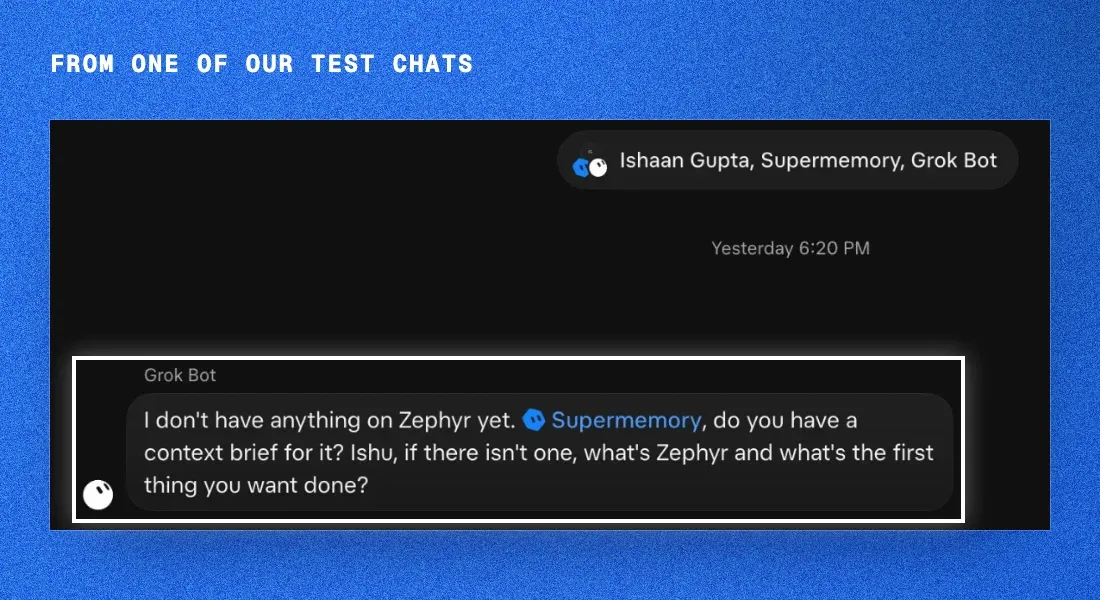
Screenshot of a Grok Bot group chat with Ishaan Gupta, Supermemory and Grok Bot. Grok Bot's message is outlined: "I don't have anything on Zephyr yet. @Supermemory, do you have a context brief for it? Ishu, if there isn't one, what's Zephyr and what's the first thing you want done?"

TL;DR

  • The Supermemory Bot is a memory teammate for your Bots. Add it once, then tag it with @Supermemory in any chat or group to ask what was decided or tell it what to keep. Your other Bots can ask it too.
  • The memories it saves go into the Supermemory account you sign in with, and project facts for a repo land in the space our Cursor, Claude Code and Codex plugins read.
  • Each Bot in Grok Bot keeps its own memory too. The newest few thousand characters of it ride along with every turn, and older entries come back through memory search, Grok Bot's support team says.

How the Supermemory Bot works

Once it's connected, say "tell my Bots about you". With your OK, it adds one line to the memory all your Bots share:

Supermemory is my memory Bot. Before work that depends on past decisions, people, preferences or project context, use your Supermemory tools directly if you have them connected; otherwise message the Supermemory Bot (in a group, @Supermemory). When something worth keeping is decided, send it to the Supermemory Bot.

When someone tags it with @Supermemory or asks it something, it leads with the answer and adds up to five supporting lines, each marked ◪. If nothing is stored, it checks a few more spaces first, then says so in one line.

A few more things it does:

  • Files each memory by kind. Every memory is a decision, a preference, a person, a project, a finding or a correction. When a fact changes, it saves the new one and notes what it replaces.
  • Saves only the preferences you state. It never saves one it only inferred.
  • Keeps secrets out. Its rules keep out passwords, tokens and payment details, and you can tell it never to remember something.
  • Takes forget requests only from you. If another Bot asks it to forget something, it says no.

Add the Supermemory Bot

Open the Supermemory Bot and choose Add to Grok Bot. In its own chat, it connects to your Supermemory account through Grok Bot's connect card: you sign in on Supermemory's own page, and no API key goes through the chat. If Supermemory is already connected in your Grok Bot, it skips the card and tells you who's signed in.
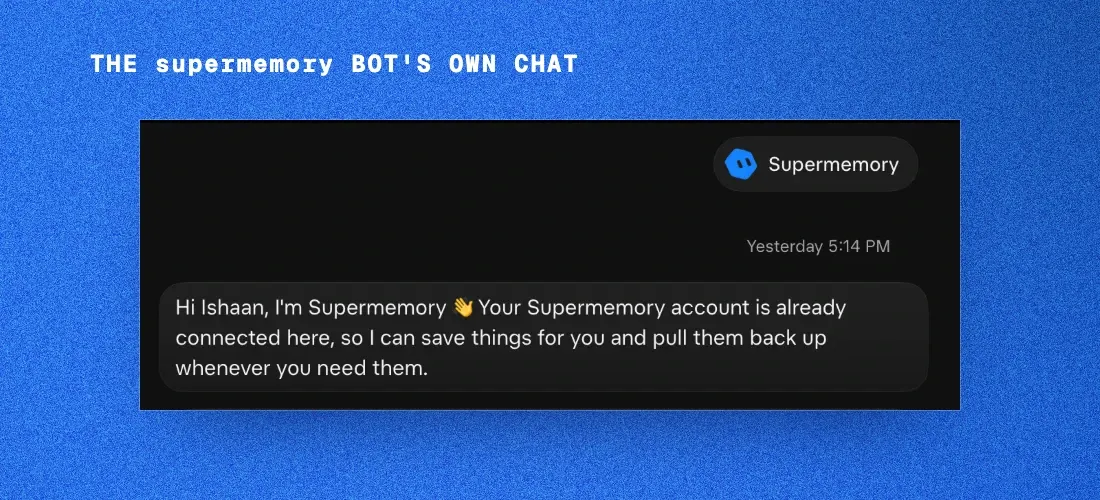
Screenshot of the Supermemory Bot's own chat in Grok Bot: "Hi Ishaan, I'm Supermemory. Your Supermemory account is already connected here, so I can save things for you and pull them back up whenever you need them."

Then bring it into a group chat, or @Supermemory it in any chat. The standing rule above is written only with your OK, so it comes from you, not from another Bot. Say "stop telling my Bots about you" to take it out.

How Grok Bot's memory works

Along with the launch, we dug into how Grok Bot's own memory works, the same way we did for Claude Code.

We figured this out by going through the Grok Bot docs, the team's design essay and the support team's answers on Cursor's community forum, then double-checking whatever we could. We haven't seen Grok Bot's code, so some things might be off. If you spot one, please tell us!

What a Bot is

Grok Bot launched in early beta on August 11. The docs describe a Bot as "a durable AI teammate with a name, a job, its own conversation, and working context that develops over time." You give it a job, message it like a coworker, and it does the work in your real tools. Here's how they introduced it:

X content is paused until you allow embedded content.

Open on X ↗

How a Bot remembers

Each Bot has a memory of its own. A Bot "retains stable preferences, important facts, and summaries from its work," such as:

  • how you like to work, and your preferences
  • rules you ask it to keep, like "Always ask before you send an email."
  • facts about you, like your name and time zone
  • a dated log of what it has worked on with you

A few facts about you, like your name and time zone, are shared by all your Bots. Everything else a Bot saves stays in that Bot's memory. Bots can still pass context to each other through messages, group chats and shared files.
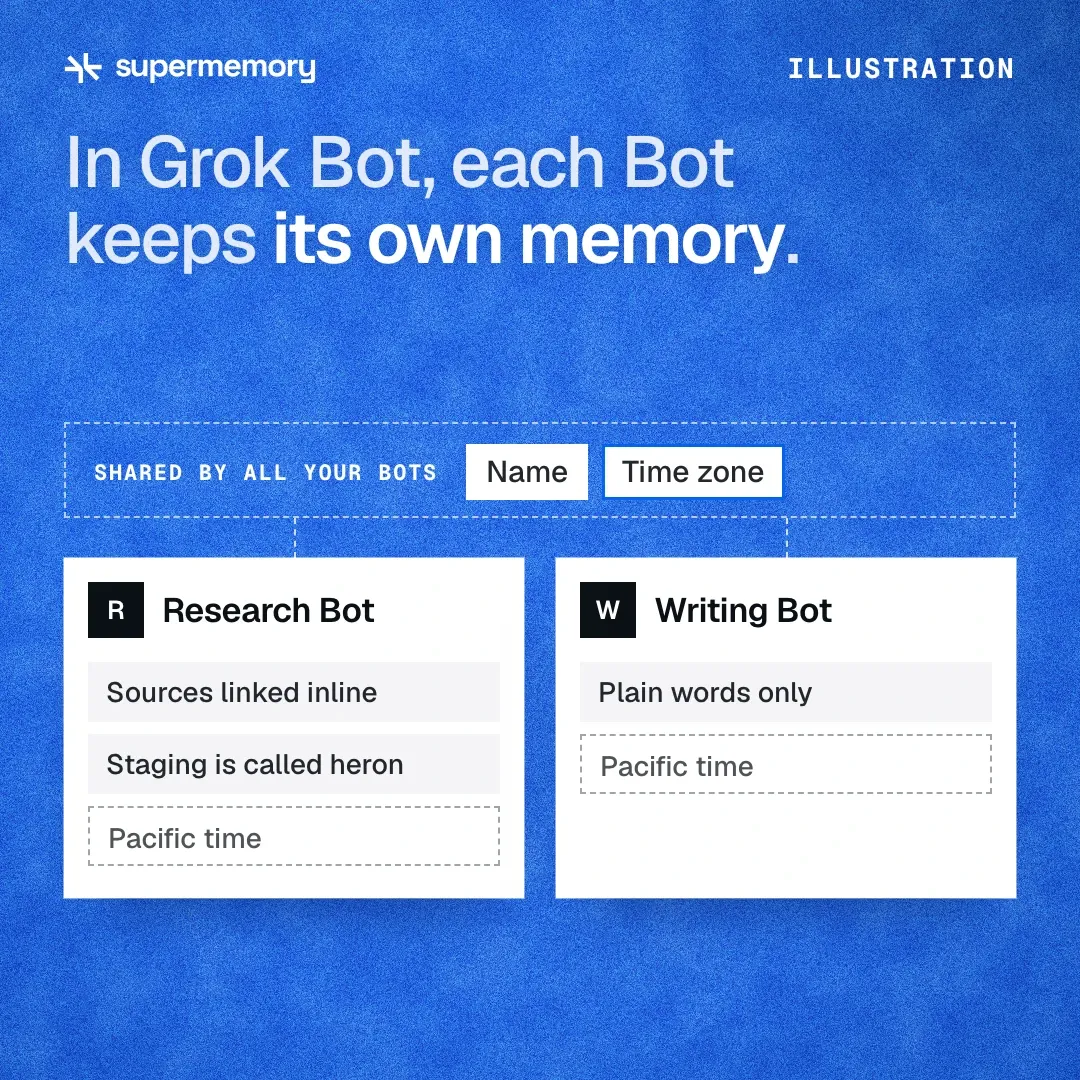
Illustration: in Grok Bot, each Bot keeps its own memory. Research Bot has "Sources linked inline" and "Staging is called heron". Writing Bot has "Plain words only". A strip labelled "Shared by all your Bots" holds Name and Time zone, and a shared "Pacific time" entry shows in both Bots.

The Bot decides what's worth keeping. It "decides on its own when something is worth keeping. It doesn't ask first." It often mentions a save in its reply, though not every save shows up in the chat. If you want something kept for sure, you tell it: "Remember that I'm out every Friday."

Personal Bots have no memory screen, so you check and fix memory by asking:

  • "What do you remember about me?"
  • "That's out of date. I moved to Denver."
  • "Forget that I'm on the launch team."

Logins, cards and contact details are kept separately, in Vault, which arrived on October 23.

What Grok Bot does really well here is keeping each Bot in its role. As the docs put it, "What a Bot saves in one chat, it remembers in all your chats with it." That's a deliberate choice, and their design essay sums it up: "capabilities can be shared broadly while context remains with the role that needs it."

Under the hood

Grok Bot's support team has filled in the details in their answers on Cursor's community forum. A Bot's memory is a profile and a dated log, and it's stored on Grok Bot's side, not as files on the Bot's computer.

Each turn, the Bot doesn't get all of it. "The bot prompt includes only a limited part of its memory: the newest profile entries and recent journal entries, plus a smaller part of shared facts that are visible to all your bots." Older entries come back only through memory search, "and search returns a limited number of results." Another answer puts a size on it. What a Bot saves rides along with every turn, but "only the newest few thousand characters of it, so a long, growing rule list pushes the oldest rules out of view."

Say that in your first week you told a Bot, "When I say ship-check, list the three deploy steps." A month and a few dozen saved rules later, that rule can drop out of the part of memory the Bot sees on every turn. It's still saved, but now the Bot has to search for it before it can use it.

The team describes this as a size limit that puts the newest entries first. The trade-off shows up with rules you set early on, so the team's tip is: "Every so often, ask a bot to merge its saved rules into one short list." It's also why a Bot's answer to "show all your memories" can come back incomplete. There's no "show everything" command, so to see it all, the team suggests having the Bot search its memory topic by topic and save what it finds to a file.

Where Supermemory fits

Grok Bot keeps memory close to the work: a Bot's memory stays with that Bot, which keeps it in its role, and group chats give the Bots shared context while they work. The Supermemory Bot adds one place to ask across chats: the decisions, people and project facts several Bots need live in Supermemory, where any of your Bots can get them by asking.

Our vibe test of Grok Bot's memory

Here's how we'd score it (✅ works well, ☑️ partly, ❌ we didn't find it), going by the docs and the team's forum answers today:

  • Setup: ✅ none, it's built in
  • Remembering preferences and rules: ☑️ you can ask it to keep something, though older rules can drop out of view (merge long rule lists now and then)
  • Keeping each Bot in its role: ✅ excellent, memory stays with each Bot
  • Keeping secrets out of memory: ✅ Vault holds logins and cards
  • Seeing what it remembers: ☑️ by asking in chat (personal Bots have no memory screen)
  • Correcting and forgetting: ☑️ by asking in chat
  • Sharing across Bots: ☑️ a few facts about you, on purpose
  • Moving memory between assistants: ☑️ import into your primary Bot, and no one-click export yet (a Bot can search its memory and save what it finds to a file)
  • Version history: ❌ not in the docs

Overall, it's a thoughtful design that keeps every Bot focused on its job. The trade-off is that each Bot's memory stays with that Bot, and you see it by asking in chat.

Try it

Add the Supermemory Bot to your Bots and sign in from its own chat. Then say "tell my Bots about you", bring it into a group chat and tag it with @Supermemory to ask what was decided.

Coding in Cursor too? Our plugin is on the Cursor Marketplace (/add-plugin cursor-supermemory). When a chat starts, it loads what Supermemory knows about the repo. It searches those memories when you ask it something substantial and saves each finished turn to the repo's space, the same one where the Bot files that project's facts.

  1. We dug into Claude Code's memory. Here's exactly how it worksLast month, our founder Dhravya Shah broke down how Instinct's memory works. We wanted to do the same for Claude, since that's where we spend most of our day.
  2. How AI memory actually works. A beginner's guideHow AI apps remember things between chats, why a bigger context window doesn't solve it, and the parts every memory system shares.
  3. We're open sourcing the company brain. Here's how we designed the multiplayer harnessCompany Brain is now open source. A walkthrough of the multiplayer harness behind its Slack experience, from proactivity and memory boundaries to approvals and recovery.
  4. Jev changes a lot in memory & context engineering. Here's exactly how.We tested Jev across reranking, chunking, observation, and harness decisions. Here is where fast decision models help memory systems, where they cost more, and where they still fall short.
  5. I reverse-engineered Instinct's memory. Here's exactly how it worksInstinct keeps its memory as git-tracked markdown files, found with grep rather than vectors. Here is the whole system as far as black-box probing can reconstruct it, and how to rebuild it on supermemory in about 60 lines.
  6. An update to supermemoryWe've discontinued the supermemory company brain and Nova. Everyone who was charged has been refunded, our MCP and plugins continue to run, and we're going all in on the memory engine.
  7. Scaling Conversations: How Adapta Grew Usage Without Losing ContextAdapta added Supermemory as a persistent memory layer so every conversation keeps its context — letting the team scale usage without losing the thread.
  8. How Chatarmin Ditched RAG and Went Memory-Only with SupermemoryChatarmin replaced a heavy RAG pipeline with Supermemory's memory layer — cutting average AI response time from 40s to 12s and token usage by 40–50%.
  9. SMFS: making agentic retrieval 55% cheaper AND more accurateWe launched SMFS.ai (Supermemory Filesystem) a few weeks ago, with a simple bet: We can redesign the filesystem specifically for agents, with special files, structures, and commands that it can use for it's tasks. Today, SMFS is used by hundreds of companies to power their agents.
  10. Introducing Dynamic Dreaming: supermemory now connects the dots, for you.Dreaming is magical. TLDR: We're launching Dynamic Dreaming in supermemory today, which automatically works if you're using supermemory in any way - API, OpenClaw, Hermes agent, etc.
  11. Dear reader, we just made supermemory insanely cheap... the Context CloudWhen I first started building supermemory, I had one goal: To build the best memory system for AI. I would talk to customers, and find out that memory was not the only thing they needed - They were all setting up 7-8 different vendors at the same time.
  12. Introducing @supermemory/tools v2.0.0Today we're releasing v2.0.0. This release unifies the API across all agents sdk integrations from AI SDK to Mastra, makes conversation identity a first-class concept, and ships with memory saving on by default.
  13. Solving the Precision-Recall Tradeoff: Search Result AggregationWhen you're building memory for AI, search is your foundational layer. The way search generally works is straightforward: the user defines a query, and then sets a limit (top-K) on how many search results they want returned. Usually, this is set to 10 or 20.
  14. OpenClaw Memory Problems: Why It Forgets and How to Fix It (2026)OpenClaw remembers by writing Markdown files in its workspace, so it forgets anything the agent didn't save. Why that breaks down, how the supermemory plugin recalls and saves on every turn instead, and how to install it, free on every plan.
  15. Stateful Coding Agents with Memory: Build Long-Running Agents (2026)We built a plugin for Claude Code and OpenCode that gives your coding agent persistent memory. It remembers your preferences, learns your codebase, and never loses context mid-conversation. The result is an agent you can run for months without starting over.
  16. Clawd / Molt bot's memory SUCKS. We gave it supermemory.I'm the founder of supermemory. Clawd/Molt bot is blowing up right now, with many, many use cases. I set it up, too, and have been using it through telegram. TLDR: just go to https://supermemory.ai/docs/integrations/clawdbot to set up supermemory for your clawd bot.
  17. Catch up with our UNFORGETTABLE Launch WeekOver the last year, one belief has guided almost everything we’ve built at Supermemory AI becomes meaningfully useful only when it remembers. Memory shouldn’t be something developers rebuild from scratch. It shouldn’t be fragile, expensive, or trapped inside a single tool.
  18. Empowering the Next Generation of Founders: Supermemory Startup ProgramIf there’s one thing we’ve learned while building Supermemory, it’s that most startups don’t fail because they didn't build features; they fail when infrastructure slows them down, or they built too slow.
  19. Building code-chunk: AST Aware Code ChunkingAt Supermemory, we're building context engineering infrastructure for AI. A huge part of that is dealing with code: ingesting repos, understanding structure, and making it searchable. The problem is that most code chunking solutions are terrible. We built code-chunk to fix this.
  20. Supermemory raises $3 million with the best memory engine for LLMsToday, I am excited to announce our first funding round to accelerate our mission of building an interoperable, scalable and reliable memory for LLMs and agents. Memory is one of the hardest challenges in AI right now.
  21. Mem0 vs Supermemory: Why Scira SwitchedScira AI moved its production memory layer from Mem0 to Supermemory. This is what failed, what improved, and how the team evaluated the two systems.
  22. Never Record Again: How Montra Uses Supermemory to Rethink Video CreationCampbell Baron, the founder of Montra, has been making videos since he was twelve. By thirteen, he was already doing brand work. Today, he’s betting on a very different future for creators: a world where recording is the exception, and most videos are generated from scratch.
  23. Unified Memory That Works Where You Work: Your Second Brain With SupermemoryHi everyone, I’m Dhravya, the founder of Supermemory. I want to start with a little story behind why this product means so much to me. You can also skip straight to what it is and how it works below.
  24. Supermemory just got faster on PlanetScaleWhat is Supermemory? Supermemory completes the missing part of the LLM puzzle: memory. Just as memory is crucial for human intelligence, it's essential for truly intelligent AI systems.
  25. Faster, smarter, reliable infinite chat: Supermemory IS context engineering.People are obsessed with prompts and prompt engineering. Sure, what you say is important, but what the model knows when you say it is the difference between a stateless text generator and an intelligent AI system. In short, context is the most crucial component.
  26. We solved AI API interoperabilityOne API to rule them all, One spec to find them, One library to bring them all and in the TypeScript, bind them. When we were building the Infinite Chat API, initially, we only supported the OpenAI format. This was fine, until a lot of our customers started asking for more.
  27. The Wow Factor of Memory - How Flow Used Supermemory To Build Smarter, Stickier ProductsOverview: Flow is a note-taking app built around a bold vision: to create a more personal, context-aware writing experience powered by AI. At the heart of this mission is memory.
  28. The UX and technicalities of awesome MCPsLast month, we launched the Supermemory MCP, mostly to test our own infrastructure and get some initial traction. It blew up. To my absolute surprise, the initial launch itself got half a million impressions (!!!). Then, we launched and got #2 on ProductHunt too.
  29. Architecting a memory engine inspired by the human brainLanguage is at the heart of intelligence, but what truly powers meaningful interaction is memory — the ability to accumulate, recall, and contextualize information over time. Large Language Models (LLMs) have mastered language, but memory remains their Achilles’ heel.
YOUR PRIVACY

Change or withdraw any time via Cookie settings in the footer. Read our cookie notice.