Claude Code persistent memory: what it keeps between sessions, and how to add more
Claude Code remembers two things between sessions: the CLAUDE.md files you write, and the auto memory notes it writes for itself. What each keeps, where they stop, and how to add memory that recalls earlier sessions and follows the repo to your other agents.
Claude Code has two kinds of persistent memory between sessions: the CLAUDE.md files you write, and the auto memory notes it writes for itself. Both load when a session starts (Anthropic docs), but nothing searches your earlier sessions for what matters to the prompt in front of you, and auto memory doesn't follow you to another machine or another agent. The supermemory plugin adds that: install it with npx supermemory plugin, sign in once in the browser, and every substantive prompt gets the matching memories from past sessions.
Below is what each built-in keeps, where it stops, how to set up the plugin, and a two-session test to check it's working. Everything was checked against Anthropic's docs and the plugin's README on October 21, 2026.
What does Claude Code remember between sessions?
Two systems carry knowledge from one session to the next, and both are loaded as context, not as rules Claude Code enforces.
| CLAUDE.md | Auto memory | |
|---|---|---|
| Who writes it | You | Claude |
| What it holds | Instructions: build commands, conventions, project layout | Notes on your preferences, corrections you gave, ongoing work |
| Where it lives | ./CLAUDE.md in the repo, ~/.claude/CLAUDE.md for you, or a file your organization manages |
~/.claude/projects/<project>/memory/ on your machine |
| When it loads | Every session, in full. Files in subfolders load when Claude works there | Every session: the first 200 lines or 25KB of MEMORY.md, then topic files when Claude needs them |
| Shared with | Your team, through Git | Every worktree of the same repo, on one machine |
Since version 2.1.277, Claude Code also reads a repo's AGENTS.md when there's no CLAUDE.md, so a repo set up for Codex works without a second file. Run /memory to open these files or turn auto memory off, and /context to see which ones loaded (Anthropic docs).
Where Claude Code's memory stops
- Nothing looks back through past sessions. CLAUDE.md loads in full and auto memory loads an index of notes. Neither searches earlier conversations for what's relevant to the prompt you just typed.
- Auto memory stays on one machine. Anthropic's docs say the files aren't shared across machines or cloud environments, so your other laptop, a teammate and a fresh container all start without them.
- Other agents keep their own. What Claude Code learned in your repo isn't there when you open the same repo in Cursor or OpenCode, because each agent keeps memory of its own.
- Claude decides what's worth keeping. It doesn't save something every session, and it skips anything it can work out from the code, such as architecture, file paths and debugging fixes.
- Chat-only instructions can get lost in compaction. After
/compact, Claude re-reads the project CLAUDE.md from disk, but an instruction you only gave in conversation is summarized with the rest of the chat and can drop out (Anthropic docs). More on this in what happens when an agent runs out of context.
How to add memory to Claude Code with supermemory
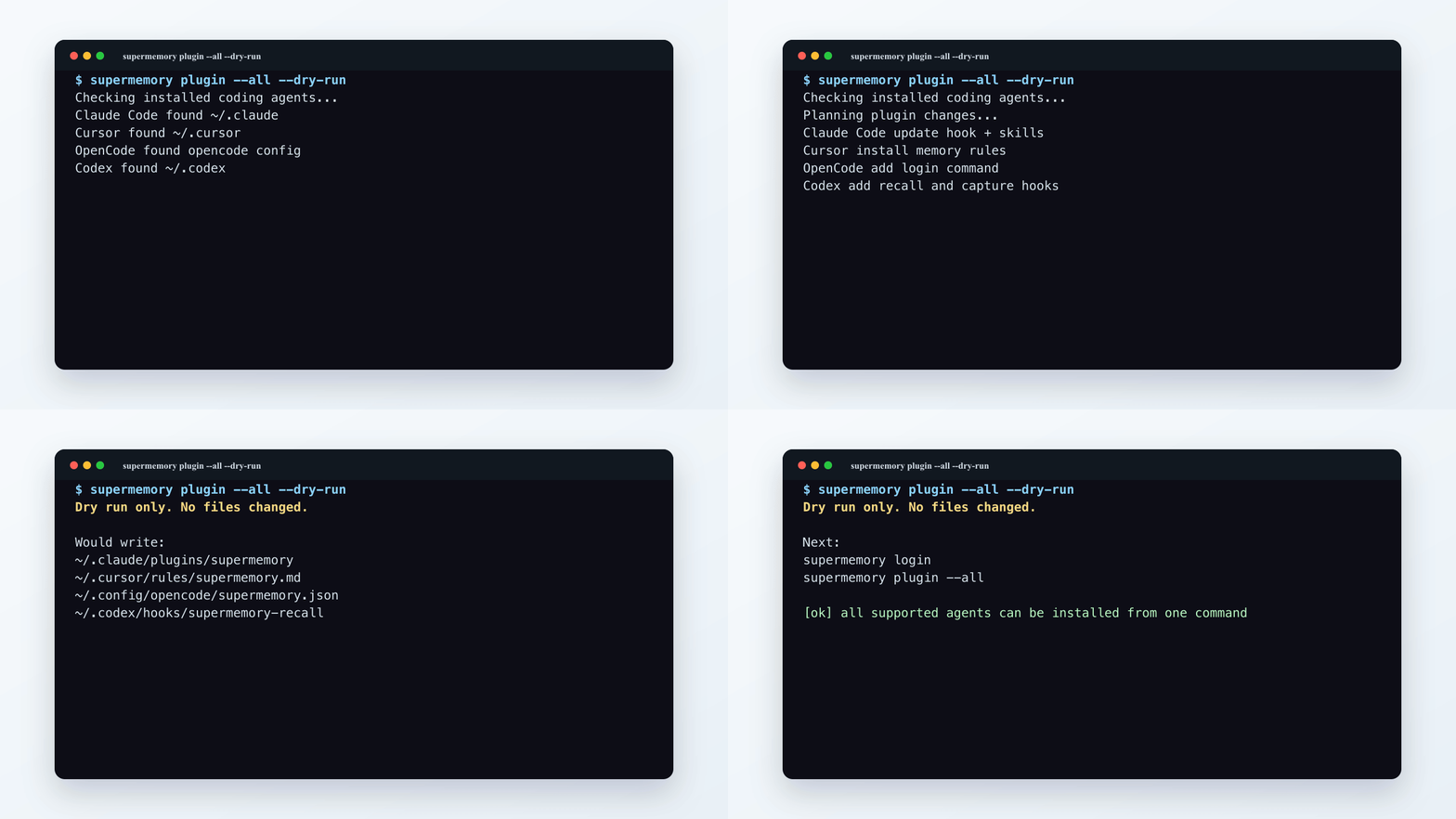
The quickest install is one command in your terminal. It finds the coding agents on your machine, installs the plugin for the ones you pick, and asks you to approve sign-in once in the browser (changelog):
npx supermemory pluginAdd --only claude to install just the Claude Code plugin, or --dry-run to see what it would change first. For Cursor, install from inside Cursor with /add-plugin cursor-supermemory instead (Cursor guide).
You can also install from inside Claude Code. The hooks run as Node scripts, so you need Node.js 18 or later on your PATH (README):
/plugin marketplace add supermemoryai/claude-supermemory
/plugin install supermemory
Then start a new session. If the plugin has no credentials, a browser window opens to sign in to the supermemory console. To use an API key instead, create one in the console and add it to your shell profile:
export SUPERMEMORY_CC_API_KEY="sm_..."The plugin is free on every plan, including Free, which comes with $5 of credits a month. What it saves and searches draws on those credits (billing docs), and the pricing page has the rates.
What the plugin does in each session
The plugin registers four hooks with Claude Code, so memory is loaded, searched and saved without you or the model asking (README):
| When | What the plugin does |
|---|---|
| A session starts | Signs you in if needed, loads your profile for the project, and tells you how many memories it loaded. If you've been away for 6 hours or more, it says when you were last here |
| You send a prompt | For each substantive prompt, searches memory with it and adds the fresh matches before Claude reads it. No tool call, no permission prompt |
| Claude calls a supermemory tool | Approves read-only lookups automatically. Saves still ask |
| Claude finishes responding | Saves the new part of the conversation in the background |
Recall used to depend on Claude deciding to search. Since the August 21 update, the hook searches on every substantive prompt itself. If you prefer the old behavior, set recallDirective in ~/.supermemory-claude/settings.json and the hook goes back to telling Claude when it might want to search.
That August update also added a status line with counts of what was loaded and saved. The current plugin no longer installs it and removes the old one. On Claude Code 2.1.287 or later in the terminal, a short headline above the prompt shows when memories came back instead.
If you installed before August 12, update the plugin. That day's security update fixed a bug where, during recall, a crafted Bash command could be approved automatically and run without your confirmation. Re-run npx supermemory plugin, or run claude plugin update supermemory@supermemory-plugins (Claude Code docs).
One memory per repo, shared with your other agents
Memories go into one container per repository, named from the repo's Git remote. The Codex, Cursor, OpenCode and Muse Code plugins use the same container, so a decision saved in Claude Code is there when you open the repo in Codex (Cursor docs). Clones of the repo share it, two repos with the same folder name don't collide, and a repo with no remote falls back to its local path. Set SUPERMEMORY_ISOLATE_WORKTREES=true if each worktree should keep its own memory.
A few more details before you rely on it:
- Credentials are scrubbed. Before saving, the plugin replaces common credential-shaped values, such as provider tokens, private keys and credentials in URLs, with redaction markers. It can't catch every secret, so keep them out of chats anyway.
- It fails open. If supermemory is slow or unreachable, the hooks exit cleanly and your session carries on. A save that failed is reported when the next session starts.
- It runs on your machine too. The plugin works with supermemory Local: run
npx supermemory localand point the plugin athttp://localhost:6767withSUPERMEMORY_API_URL(self-hosting docs). There's more on that setup in self-hosted memory for AI agents.
CLAUDE.md, auto memory or the plugin: what goes where
The plugin doesn't replace CLAUDE.md. Each kind of fact has a better home:
| What Claude should know | Where it belongs | Why |
|---|---|---|
| Build, test and lint commands | The repo's CLAUDE.md or AGENTS.md | Every session and every teammate needs them, and changes go through review |
| Team conventions | CLAUDE.md, or .claude/rules/ for one part of the codebase |
Stable, shared and easy to check in a pull request |
| Your own preferences | ~/.claude/CLAUDE.md or auto memory |
They apply to you, not to the team |
| Why an approach was dropped last week | supermemory | It came up in a session and nobody wrote it down |
| What you were halfway through | supermemory | It changes daily, and it should follow you to another agent or machine |
| Secrets and tokens | Neither | Keep them in your secret manager |
Keep the scopes apart. "Use verbose logging while we debug this" is a one-task exception that shouldn't become a team rule, and "we moved from Jest to Vitest" is worth checking against the current package.json before anyone relies on it.
Test it in two sessions
Use a fact Claude couldn't guess, so a right answer can only come from memory:
- In a repo with the plugin installed, tell Claude something specific: "we deploy from the release branch, never from main."
- Let the response finish, then exit. Memories form in the background, so if step 3 comes back empty, give it a little longer and ask again.
- Start a new session in the same repo and ask "which branch do we deploy from?" It should say the release branch without you repeating it.
- Correct it in a new session ("we deploy from the deploy branch now") and check that the new answer wins.
- Ask from a different repo. The fact shouldn't come up there.
- Open the same repo in Codex with the Codex plugin and ask again. It reads the same memory.
If a step fails, run /supermemory:status. It shows whether you're signed in, whether the API and the MCP server are reachable, and which project container is active.
How is the plugin different from connecting MCP?
With an MCP server alone, Claude decides when to call the memory tools, so whether anything is saved or recalled depends on the model. The plugin's hooks recall on every substantive prompt and save after each response, and it also registers supermemory's MCP tools for deliberate searches and saves. If you want one memory across Claude, ChatGPT and other chat apps, that's what the MCP server is for, and connecting your MCP clients covers the setup.
The coding agents page covers the plugins for Cursor, Codex, OpenCode and Hermes too. For an agent you build yourself, the quickstart shows the same loop on the API: load the profile and search before the model answers, save after.
Common questions
Does Claude Code have memory across sessions?
Yes, two kinds. CLAUDE.md files hold instructions you write, and auto memory holds notes Claude writes about your preferences and ongoing work. Both load at the start of every session. Neither recalls earlier sessions by relevance, and auto memory stays on the machine that wrote it.
Where does Claude Code store its memory?
CLAUDE.md lives in your repo (./CLAUDE.md or ./.claude/CLAUDE.md) and in ~/.claude/CLAUDE.md for instructions that apply to all your projects. Auto memory lives in ~/.claude/projects/<project>/memory/, with MEMORY.md as the index.
Can I turn off auto memory?
Yes. Use the toggle in /memory, set "autoMemoryEnabled": false in a project's settings, or set CLAUDE_CODE_DISABLE_AUTO_MEMORY=1. The supermemory plugin works either way, and you can run both.
Which memory tool is best for Claude Code?
It depends on whether you work on one machine with one agent or across several. We compared the built-ins, claude-mem, other memory plugins and supermemory on the same criteria in best memory for Claude Code.
What does the plugin cost?
The plugin is free on every supermemory plan, including Free, which comes with $5 of credits a month. Saving and searching draw on those credits (billing docs), and the pricing page has the rates. Setup details and settings are in the plugin README.