Graph RAG tutorial: build a knowledge graph for RAG, step by step
Build a knowledge graph for RAG step by step in Python. Extract triples, resolve entities, store them with their sources, walk the graph to answer multi-hop questions, test it, then move it to Neo4j.

Graph RAG retrieves facts by following relationships in a knowledge graph, instead of only finding text chunks that look similar to the question. You extract entities and relationships from your documents, store them as a graph with a source on every edge, and at question time walk the graph from the entities in the question to collect connected facts for the model.
This tutorial builds that end to end in Python. The core runs on the standard library alone, so you can paste it into one file and run it. Two optional steps add an LLM for extraction and Neo4j for storage.
Why vector search alone falls short
If you've built RAG with embeddings, you know the drill: turn documents into vectors, store them, and retrieve the chunks closest to the question. It works until a question depends on how things connect rather than on what a passage says. Embeddings capture similarity, not structure. They don't know that one supplier ships to Germany or that a product needs a part another supplier makes.
That becomes a problem when:
- You need business logic. "Only suppliers that passed compliance and sit in the EU" is a filter over relationships, not a similarity score.
- The answer spans documents. "Which suppliers in Europe provide parts for the X200?" needs the bill of materials, the contracts and a country list together. No single chunk holds it.
- You need to explain the answer. A graph gives you the path and the source of every step, so you can show why a supplier was named.
A knowledge graph adds that structure. It isn't a replacement for vector search: most systems use both, with graph traversal for relationship questions and hybrid search for text questions. The graph RAG vs vector RAG guide covers when each one fits.
How knowledge graphs work
A knowledge graph stores facts as triples: a subject, a relation and an object.
(Volta Cells)  -[SUPPLIES]->   (battery pack)
(battery pack) -[USED_IN]->    (X200 scooter)
(Volta Cells)  -[LOCATED_IN]-> (Germany)
Each subject and object becomes a node, and each relation becomes an edge between them. Once facts are stored this way, a question turns into a walk: start at the X200, follow USED_IN backwards to its parts, follow SUPPLIES backwards to their suppliers, and keep only suppliers whose LOCATED_IN edge leads to a country in Europe. Every edge you crossed is evidence for the answer.
GraphRAG, the method Microsoft Research published in 2024, goes a step further (paper). It uses an LLM to build an entity graph from the documents, groups closely related entities into communities and pre-writes a summary of each, so it can answer questions about a whole corpus, such as "what are the main themes?", which ordinary RAG handles poorly. Microsoft's GraphRAG library calls that global search, and calls the entity-centered kind local search: it combines facts from the graph with text chunks of the source documents. This tutorial builds the local kind, the one for questions about specific things, from graph facts alone.
What you'll build
A question-answering graph for a small e-scooter maker. The data is a few purchase orders, a bill of materials, a country list and one email from procurement. The question:
Which suppliers in Europe provide parts for the X200 scooter?
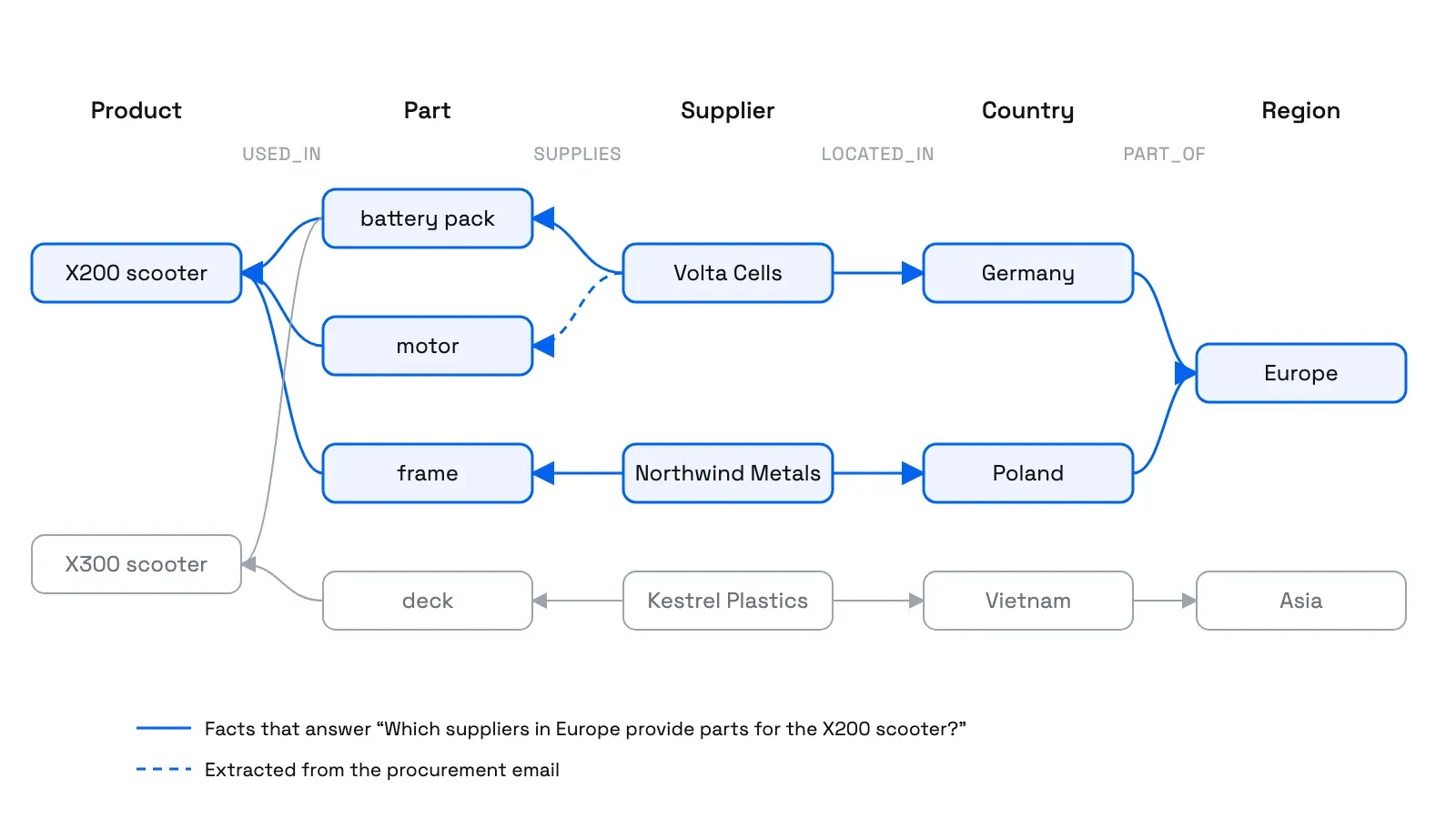
The right answer needs four kinds of fact from four sources, and one of them only appears in the email. You'll need Python 3.10 or later. Steps 1 to 9 need nothing else. The optional LLM part of step 3 needs pip install openai pydantic and an API key, and the optional Neo4j step needs pip install neo4j and a running Neo4j database.
Step 1: Define the schema
Decide which relations exist before extracting anything. A fixed list keeps the graph queryable and lets you reject what an extraction model invents.
import re
import sqlite3

TENANT = "acme"

# Step 1: the schema. Only these relations are allowed: (subject type, object type).
RELATIONS = {
    "SUPPLIES": ("supplier", "component"),
    "USED_IN": ("component", "product"),
    "LOCATED_IN": ("supplier", "country"),
    "PART_OF": ("country", "region"),
}
TENANT matters even in a demo. Every node and edge belongs to one customer, and every query filters on it, so shared names can't create paths across customers.
Step 2: Turn structured records into triples
Rows that already have columns don't need a model. Map them to triples directly, and keep the source of each one.
# Step 2: structured records become triples directly. Every triple keeps its source.
purchase_orders = [
    {"po": "PO-1001", "supplier": "Volta Cells GmbH", "component": "battery pack", "country": "Germany"},
    {"po": "PO-1002", "supplier": "Northwind Metals", "component": "frame", "country": "Poland"},
    {"po": "PO-1003", "supplier": "Kestrel Plastics", "component": "deck", "country": "Vietnam"},
]
bill_of_materials = {"X200 scooter": ["battery pack", "motor", "frame"], "X300 scooter": ["battery pack", "deck"]}
regions = {"Germany": "Europe", "Poland": "Europe", "Vietnam": "Asia"}


def triples_from_records():
    for row in purchase_orders:
        source = f"po:{row['po']}"
        yield row["supplier"], "SUPPLIES", row["component"], source
        yield row["supplier"], "LOCATED_IN", row["country"], source
    for product, parts in bill_of_materials.items():
        for part in parts:
            yield part, "USED_IN", product, "doc:bom-2026-09"
    for country, region in regions.items():
        yield country, "PART_OF", region, "ref:regions"
Step 3: Extract triples from text with an LLM
Free text needs a model. Ask it for triples in your schema, each with the exact words that state the fact, then check the answer before anything enters the graph: the relation must be in the schema, and the evidence must be a real quote from the source.
# Step 3: an LLM proposes triples from free text. Keep one only if its relation is in the
# schema and its evidence is an exact quote from the source.
email = ("Heads up from procurement: Volta Cells, the Leipzig battery people, "
         "will also supply the motor for the X200 from May.")
proposed = [  # what a model might return for the email (see the extraction code below)
    {"subject": "Volta Cells", "relation": "SUPPLIES", "object": "motor",
     "evidence": "Volta Cells, the Leipzig battery people, will also supply the motor"},
    {"subject": "Volta Cells", "relation": "HEADQUARTERED_IN", "object": "Leipzig",
     "evidence": "the Leipzig battery people"},
]


def validate(proposed, source_text, source_id):
    accepted, rejected = [], []
    for t in proposed:
        if t["relation"] in RELATIONS and t["evidence"] in source_text:
            accepted.append((t["subject"], t["relation"], t["object"], source_id))
        else:
            rejected.append(t)
    return accepted, rejected
proposed stands in for a model's output so the tutorial runs without a key. The second proposal is the kind of thing models add: plausible, but a relation the schema doesn't have, so validate rejects it. To call a model for real, here's an extraction function using OpenAI's Structured Outputs, which makes the model return JSON that matches a Pydantic schema (OpenAI docs):
import os
from openai import OpenAI
from pydantic import BaseModel


class Triple(BaseModel):
    subject: str
    relation: str
    object: str
    evidence: str  # the exact words in the source that state the fact


class Extraction(BaseModel):
    triples: list[Triple]


client = OpenAI()  # reads OPENAI_API_KEY


def extract(text):
    response = client.responses.parse(
        model=os.environ["OPENAI_MODEL"],  # any current model that supports Structured Outputs
        input=[
            {"role": "system", "content": "Extract facts from the text as subject, relation, object triples. "
                                          "Use only these relations: " + ", ".join(RELATIONS) + ". "
                                          "For each triple, copy the exact words that state it as evidence."},
            {"role": "user", "content": text},
        ],
        text_format=Extraction,
    )
    return [t.model_dump() for t in response.output_parsed.triples]
Then set proposed = extract(email). Any model with structured output works the same way. The validation step is what keeps the graph honest.
Step 4: Resolve entities
The purchase order says "Volta Cells GmbH" and the email says "Volta Cells". If those become two nodes, the graph can't connect the motor to the supplier in Germany. Entity resolution decides when two names mean the same thing:
# Step 4: resolve names to stable ids. This rule drops legal suffixes so "Volta Cells GmbH"
# and "Volta Cells" become one supplier, and records which rule made the match.
LEGAL_SUFFIX = re.compile(r"\s+(gmbh|inc|ltd|llc)\.?$")


def resolve(name, kind):
    key = LEGAL_SUFFIX.sub("", name.lower().strip())
    rule = "legal-suffix" if key != name.lower().strip() else "exact"
    return f"{kind}:" + re.sub(r"[^a-z0-9]+", "-", key).strip("-"), rule
A suffix rule is the simplest safe case. Real data needs more care, and getting it wrong attaches correct facts to the wrong entity:
- Separate labels from identity. Two people can share a name, and one company can be renamed. Prefer stable IDs from the source system (a vendor number, an email domain you've verified) over display names.
- Never merge across tenants. Two customers' "Acme" are different companies, however similar the descriptions.
- Record why a match was made. A confirmed ID match, a rule and a model's guess carry different weight. Keep the rule with the alias, as the
aliasestable below does, so you can revisit it. - Leave hard cases apart. Two unresolved nodes are safer than one wrong merge, and a wrong merge is hard to undo: you have to find every fact that came from the wrong source and move it.
Test renames, two people with the same name, a reused email address and two sources that contradict each other.
Step 5: Store the graph with its sources
SQLite is enough to prove the model works. Three tables hold entities, the names that point to them, and edges with their source and an active flag:
# Step 5: store entities, aliases and edges with their source, per tenant.
db = sqlite3.connect(":memory:")
db.executescript("""
CREATE TABLE entities (tenant TEXT, id TEXT, kind TEXT, name TEXT, PRIMARY KEY (tenant, id));
CREATE TABLE aliases (tenant TEXT, alias TEXT, entity_id TEXT, rule TEXT, PRIMARY KEY (tenant, alias));
CREATE TABLE edges (tenant TEXT, subject TEXT, relation TEXT, object TEXT, source TEXT,
                    active INTEGER NOT NULL DEFAULT 1,
                    PRIMARY KEY (tenant, subject, relation, object, source));
""")


def add_triple(tenant, subject, relation, obj, source):
    ids = []
    for name, kind in zip((subject, obj), RELATIONS[relation]):
        entity_id, rule = resolve(name, kind)
        db.execute("INSERT OR IGNORE INTO entities VALUES (?, ?, ?, ?)", (tenant, entity_id, kind, name))
        db.execute("INSERT OR IGNORE INTO aliases VALUES (?, ?, ?, ?)", (tenant, name.lower(), entity_id, rule))
        ids.append(entity_id)
    db.execute("INSERT OR IGNORE INTO edges (tenant, subject, relation, object, source) VALUES (?, ?, ?, ?, ?)",
               (tenant, ids[0], relation, ids[1], source))


for triple in triples_from_records():
    add_triple(TENANT, *triple)
accepted, rejected = validate(proposed, email, "email:2026-04-12")
for triple in accepted:
    add_triple(TENANT, *triple)
add_triple("globex", "Volta Cells GmbH", "SUPPLIES", "frame", "po:G-77")  # another customer's data
The last line adds a fact for a different customer on purpose, so the tests in step 8 can prove it never shows up in this customer's answers.
Step 6: Retrieve a neighborhood of the graph
At question time, find the entities the question mentions, then collect every edge within two hops of them. Two hops reach from the product to its parts to their suppliers, and from the region to its countries to the suppliers there.
# Step 6: find the entities a question mentions, then walk their neighborhood.
def entities_in(question, tenant):
    q = question.lower()
    rows = db.execute("SELECT alias, entity_id FROM aliases WHERE tenant = ?", (tenant,))
    return sorted({entity_id for alias, entity_id in rows if re.search(rf"\b{re.escape(alias)}\b", q)})


def neighborhood(start, tenant, hops=2):
    nodes, facts = set(start), set()
    for _ in range(hops):
        marks = ",".join("?" * len(nodes))
        rows = db.execute(f"""SELECT subject, relation, object, source FROM edges
                              WHERE tenant = ? AND active = 1
                              AND (subject IN ({marks}) OR object IN ({marks}))""",
                          (tenant, *nodes, *nodes)).fetchall()
        facts.update(rows)
        nodes |= {r[0] for r in rows} | {r[2] for r in rows}
    return sorted(facts)


question = "Which suppliers in Europe provide parts for the X200 scooter?"
start = entities_in(question, TENANT)
facts = neighborhood(start, TENANT)
start comes back as ['product:x200-scooter', 'region:europe']. Matching names in the question is the simplest form of entity linking. In production you'd also match the question against entity names with embeddings or let a model pick them.
Step 7: Generate an answer with sources
Hand the model the facts, each with its source, and ask for an answer that cites them:
# Step 7: give the model the facts, each with its source, and ask for a cited answer.
context = "\n".join(f"{s} {r} {o} [{src}]" for s, r, o, src in facts)
prompt = ("Answer using only these facts, and cite the source in brackets for each claim.\n\n"
          f"Facts:\n{context}\n\nQuestion: {question}")
print(prompt)
It prints these facts, ahead of the question:
component:battery-pack USED_IN product:x200-scooter [doc:bom-2026-09]
component:battery-pack USED_IN product:x300-scooter [doc:bom-2026-09]
component:frame USED_IN product:x200-scooter [doc:bom-2026-09]
component:motor USED_IN product:x200-scooter [doc:bom-2026-09]
country:germany PART_OF region:europe [ref:regions]
country:poland PART_OF region:europe [ref:regions]
supplier:northwind-metals LOCATED_IN country:poland [po:PO-1002]
supplier:northwind-metals SUPPLIES component:frame [po:PO-1002]
supplier:volta-cells LOCATED_IN country:germany [po:PO-1001]
supplier:volta-cells SUPPLIES component:battery-pack [po:PO-1001]
supplier:volta-cells SUPPLIES component:motor [email:2026-04-12]
These facts support one answer: Volta Cells (battery pack and motor, Germany) and Northwind Metals (frame, Poland). The motor comes from the email, so a search over the purchase orders alone would have missed that Volta supplies it. Kestrel Plastics never appears, because nothing connects it to the X200 or to Europe. To get the written answer, send the prompt to any model. With the OpenAI client from step 3:
answer = client.responses.create(
    model=os.environ["OPENAI_MODEL"], input=prompt
).output_text
Step 8: Test the graph
A graph that looks right in a visualization can still be wrong. Write the questions you care about as tests, with the answers the stored facts should give:
# Step 8: test the graph. These are the answers the stored facts support.
def suppliers_for(product, region, tenant=TENANT):
    rows = db.execute("""
        SELECT DISTINCT s.subject FROM edges s
        JOIN edges u ON u.tenant = s.tenant AND u.subject = s.object AND u.relation = 'USED_IN' AND u.active = 1
        JOIN edges l ON l.tenant = s.tenant AND l.subject = s.subject AND l.relation = 'LOCATED_IN' AND l.active = 1
        JOIN edges p ON p.tenant = s.tenant AND p.subject = l.object AND p.relation = 'PART_OF' AND p.active = 1
        WHERE s.tenant = ? AND s.relation = 'SUPPLIES' AND s.active = 1 AND u.object = ? AND p.object = ?
        ORDER BY s.subject""", (tenant, product, region)).fetchall()
    return [r[0] for r in rows]


assert suppliers_for("product:x200-scooter", "region:europe") == ["supplier:northwind-metals", "supplier:volta-cells"]
assert suppliers_for("product:x300-scooter", "region:asia") == ["supplier:kestrel-plastics"]
assert suppliers_for("product:x200-scooter", "region:europe", tenant="globex") == []  # nothing leaks across tenants
assert ("supplier:volta-cells", "SUPPLIES", "component:motor", "email:2026-04-12") in facts  # the email fact made it in
assert all(source for *_, source in facts)  # every fact the model sees has a source
assert all(source != "po:G-77" for *_, source in facts)  # the other customer's fact stays out

# A contract ends: deactivate the edge and the answer changes.
db.execute("UPDATE edges SET active = 0 WHERE tenant = ? AND subject = ? AND relation = 'SUPPLIES'",
           (TENANT, "supplier:northwind-metals"))
assert suppliers_for("product:x200-scooter", "region:europe") == ["supplier:volta-cells"]
db.execute("UPDATE edges SET active = 1 WHERE tenant = ? AND subject = ?", (TENANT, "supplier:northwind-metals"))
print("All checks passed")
Add a test for every bug you find. The useful cases are the two-hop answer, a question with no path, another tenant's data, and a fact that stopped being true.
Step 9: Measure knowledge graph quality
Four checks tell you whether the graph is good enough to answer from:
- Coverage: how much of your source data made it into the graph. If the records name three suppliers and only two have edges, the graph can't answer questions about the third.
- Accuracy: whether the edges are right. Pick a random sample and check each against its source. This is the check that catches extraction mistakes.
- Completeness: whether required relationships exist. If every supplier must have a location, list the ones that don't.
- Explainability: whether every edge carries a source you can show. The step 8 tests check it for every fact the model sees.
# Step 9: measure the graph.
known = {resolve(row["supplier"], "supplier")[0] for row in purchase_orders}
supplying = {s for (s,) in db.execute(
    "SELECT DISTINCT subject FROM edges WHERE tenant = ? AND relation = 'SUPPLIES'", (TENANT,))}
located = {s for (s,) in db.execute(
    "SELECT DISTINCT subject FROM edges WHERE tenant = ? AND relation = 'LOCATED_IN'", (TENANT,))}
print(f"Coverage: {len(known & supplying)} of {len(known)} suppliers have a SUPPLIES edge")
print("Completeness: suppliers with no location:", sorted(supplying - located) or "none")
print("Spot-check these against their sources:")
for row in db.execute("SELECT subject, relation, object, source FROM edges WHERE tenant = ? ORDER BY random() LIMIT 3",
                      (TENANT,)):
    print(" ", row)
On this data it reports 3 of 3 suppliers covered and none missing a location. Compare like with like: coverage is the share of known suppliers that have edges, so it can never pass 100%. If your number does, you're counting nodes that aren't suppliers. For extraction, also measure precision and recall against a hand-labeled sample of documents, since a model can miss facts as well as invent them.
Step 10 (optional): Move the graph to Neo4j
SQLite proves the model. When traversals get deeper or you want to explore the graph visually, a graph database helps. This loads the same edges into Neo4j with the official Python driver and runs the question as a Cypher pattern:
import os
from neo4j import GraphDatabase

URI = "neo4j://localhost:7687"
AUTH = ("neo4j", os.environ["NEO4J_PASSWORD"])

with GraphDatabase.driver(URI, auth=AUTH) as driver:
    rows = db.execute("SELECT subject, relation, object, source FROM edges WHERE tenant = ? AND active = 1", (TENANT,))
    for subject, relation, obj, source in rows:
        assert relation in RELATIONS  # the type is pasted into the query text, so allow only schema types
        driver.execute_query(
            f"""
            MERGE (s:Entity {{id: $subject, tenant: $tenant}})
            MERGE (o:Entity {{id: $object, tenant: $tenant}})
            MERGE (s)-[:{relation} {{source: $source}}]->(o)
            """,
            subject=subject, object=obj, source=source, tenant=TENANT,
            database_="neo4j",
        )

    records, _, _ = driver.execute_query(
        """
        MATCH (s:Entity {tenant: $tenant})-[supplies:SUPPLIES]->(part)-[:USED_IN]->(:Entity {id: $product}),
              (s)-[:LOCATED_IN]->(:Entity)-[:PART_OF]->(:Entity {id: $region})
        RETURN s.id AS supplier, part.id AS part, supplies.source AS source
        """,
        tenant=TENANT, product="product:x200-scooter", region="region:europe",
        database_="neo4j",
    )
    for record in records:
        print(record.data())
In Cypher, round brackets are nodes and -[:SUPPLIES]-> is a relationship, so the MATCH reads like the walk described earlier. Port the step 8 tests too, and run them against Neo4j before you trust it. An earlier version of this tutorial used py2neo, which its maintainer has since declared end of life in favor of the official drivers.
Keep the graph true over time
Facts change, and a graph that only adds edges slowly fills with contradictions. Three kinds of change need different handling:
- An update replaces what's current. When Northwind's frame contract ends, current questions should stop naming Northwind, but a question about last year should still find it. Deactivate the edge instead of deleting it, and store when a fact became true separately from when you learned it, since learning about an old contract today doesn't make it start today. The temporal memory guide shows interval queries.
- An extension adds detail. The email didn't replace Volta's battery contract. It added the motor. Treating every new fact as a replacement loses detail, and treating every correction as an extension piles up contradictions.
- An inference is derived, not stated. "Volta is probably based in Leipzig" comes from a nickname in an email. Keep inferences separate from stated facts, with their sources, and don't let them override a record from the system of record.
When a source is deleted or a user loses access to it, every edge derived from it has to stop reaching answers, not just the citation.
When you want this for memory, not documents
Everything above is a graph you design and maintain: your schema, your extraction, your resolution rules. That's the right call for domain data with explicit relationships, like supply chains or service dependencies.
Agent memory is a different shape of problem: facts about users and projects that change constantly, extracted from conversations nobody structured. Supermemory builds that graph for you. When you add content, it extracts memories and links them as updates, extensions or derived facts, keeps the latest version current for search, and lets you pull related memories back with a result (graph memory docs):
await supermemory.add("user_123", {
  content: "Alex mentioned he just started at Stripe",
});

const { results } = await supermemory.search("user_123", {
  query: "where does Alex work?",
  include: { related: true },
  searchMode: "memories",
});
Memories form in the background after an add, so a search on a brand-new namespace can come back empty at first. You don't define a schema or draw edges, and you can explore the result in the memory graph view. Keep the custom graph from this tutorial for explicit domain relationships, and test both against the same questions if you're deciding between them.
Common questions
What is the difference between Graph RAG and GraphRAG?
Graph RAG is the general idea of retrieving from a knowledge graph for generation. GraphRAG, one word, usually means Microsoft Research's method and library, which adds community detection and pre-written community summaries so it can answer questions about a whole corpus.
Do I need a graph database for Graph RAG?
No. A relational database handles small graphs and two- or three-hop questions well, as this tutorial shows. A graph database helps when traversals get deep or variable in length, or when you want to explore the graph visually.
Can an LLM build the knowledge graph for me?
It can propose triples, and it's fast at it. Constrain it to your schema, require a quote as evidence for each fact, validate before inserting, and measure precision and recall on a labeled sample, because models both miss facts and invent them.
Is Graph RAG better than vector RAG?
For questions about how things connect, often yes. For finding a passage that answers a question in its own words, vector or hybrid search is simpler and usually enough. Many systems use both: graph traversal for the relationships, text retrieval for the details.