> ## Documentation Index
> Fetch the complete documentation index at: https://supermemory.ai/docs/llms.txt
> Use this file to discover all available pages before exploring further.
# Quickstart
> Make your first API call to Supermemory - add and retrieve memories.
**Using Vercel AI SDK?** Check out the [AI SDK integration](/integrations/ai-sdk) for the cleanest implementation with `@supermemory/tools/ai-sdk`.
**Prefer to run it locally?** Supermemory is also a [self-hostable single binary](/self-hosting/overview) — `curl -fsSL https://supermemory.ai/install | bash` and you're running.
## Memory API
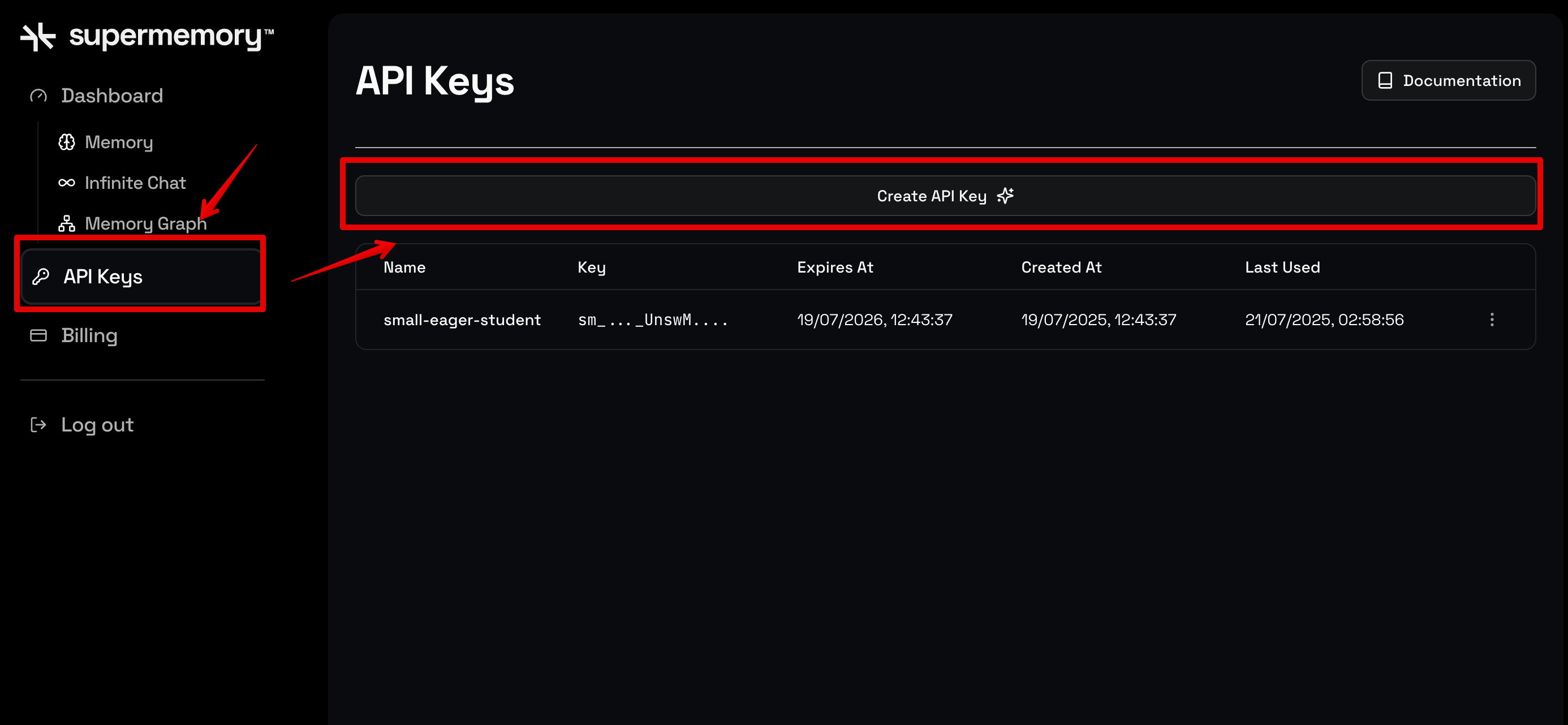
**Step 1.** Sign up for [Supermemory's Developer Platform](http://console.supermemory.ai) to get the API key. Click on **API Keys -> Create API Key** to generate one.
 **Step 2.** Install the SDK and set your API key:
```bash theme={null}
pip install supermemory
export SUPERMEMORY_API_KEY="YOUR_API_KEY"
```
```bash theme={null}
npm install supermemory
export SUPERMEMORY_API_KEY="YOUR_API_KEY"
```
**Step 3.** Here's everything you need to add memory to your LLM:
```python theme={null}
from supermemory import Supermemory
client = Supermemory()
USER_ID = "dhravya"
conversation = [
{"role": "assistant", "content": "Hello, how are you doing?"},
{"role": "user", "content": "Hello! I am Dhravya. I am 20 years old. I love to code!"},
{"role": "user", "content": "Can I go to the club?"},
]
# Get user profile + relevant memories for context
profile = client.profile(container_tag=USER_ID, q=conversation[-1]["content"])
static = "\n".join(profile.profile.static)
dynamic = "\n".join(profile.profile.dynamic)
memories = "\n".join(r.get("memory", "") for r in profile.search_results.results)
context = f"""Static profile:
{static}
Dynamic profile:
{dynamic}
Relevant memories:
{memories}"""
# Build messages with memory-enriched context
messages = [{"role": "system", "content": f"User context:\n{context}"}, *conversation]
# response = llm.chat(messages=messages)
# Store conversation for future context
client.add(
content="\n".join(f"{m['role']}: {m['content']}" for m in conversation),
container_tag=USER_ID,
)
```
```typescript theme={null}
import Supermemory from "supermemory";
const client = new Supermemory();
const USER_ID = "dhravya";
const conversation = [
{ role: "assistant", content: "Hello, how are you doing?" },
{ role: "user", content: "Hello! I am Dhravya. I am 20 years old. I love to code!" },
{ role: "user", content: "Can I go to the club?" },
];
// Get user profile + relevant memories for context
const profile = await client.profile({
containerTag: USER_ID,
q: conversation.at(-1)!.content,
});
const context = `Static profile:
${profile.profile.static.join("\n")}
Dynamic profile:
${profile.profile.dynamic.join("\n")}
Relevant memories:
${profile.searchResults.results.map((r) => r.memory).join("\n")}`;
// Build messages with memory-enriched context
const messages = [{ role: "system", content: `User context:\n${context}` }, ...conversation];
// const response = await llm.chat({ messages });
// Store conversation for future context
await client.add({
content: conversation.map((m) => `${m.role}: ${m.content}`).join("\n"),
containerTag: USER_ID,
});
```
That's it! Supermemory automatically:
* Extracts memories from conversations
* Builds and maintains user profiles (static facts + dynamic context)
* Returns relevant context for personalized LLM responses
**Optional:** Use the `threshold` parameter to filter search results by relevance score. For example: `client.profile(container_tag=USER_ID, threshold=0.7, q=query)` will only include results with a score above 0.7.
Learn more about [User Profiles](/user-profiles) and [Search](/search).
**Step 2.** Install the SDK and set your API key:
```bash theme={null}
pip install supermemory
export SUPERMEMORY_API_KEY="YOUR_API_KEY"
```
```bash theme={null}
npm install supermemory
export SUPERMEMORY_API_KEY="YOUR_API_KEY"
```
**Step 3.** Here's everything you need to add memory to your LLM:
```python theme={null}
from supermemory import Supermemory
client = Supermemory()
USER_ID = "dhravya"
conversation = [
{"role": "assistant", "content": "Hello, how are you doing?"},
{"role": "user", "content": "Hello! I am Dhravya. I am 20 years old. I love to code!"},
{"role": "user", "content": "Can I go to the club?"},
]
# Get user profile + relevant memories for context
profile = client.profile(container_tag=USER_ID, q=conversation[-1]["content"])
static = "\n".join(profile.profile.static)
dynamic = "\n".join(profile.profile.dynamic)
memories = "\n".join(r.get("memory", "") for r in profile.search_results.results)
context = f"""Static profile:
{static}
Dynamic profile:
{dynamic}
Relevant memories:
{memories}"""
# Build messages with memory-enriched context
messages = [{"role": "system", "content": f"User context:\n{context}"}, *conversation]
# response = llm.chat(messages=messages)
# Store conversation for future context
client.add(
content="\n".join(f"{m['role']}: {m['content']}" for m in conversation),
container_tag=USER_ID,
)
```
```typescript theme={null}
import Supermemory from "supermemory";
const client = new Supermemory();
const USER_ID = "dhravya";
const conversation = [
{ role: "assistant", content: "Hello, how are you doing?" },
{ role: "user", content: "Hello! I am Dhravya. I am 20 years old. I love to code!" },
{ role: "user", content: "Can I go to the club?" },
];
// Get user profile + relevant memories for context
const profile = await client.profile({
containerTag: USER_ID,
q: conversation.at(-1)!.content,
});
const context = `Static profile:
${profile.profile.static.join("\n")}
Dynamic profile:
${profile.profile.dynamic.join("\n")}
Relevant memories:
${profile.searchResults.results.map((r) => r.memory).join("\n")}`;
// Build messages with memory-enriched context
const messages = [{ role: "system", content: `User context:\n${context}` }, ...conversation];
// const response = await llm.chat({ messages });
// Store conversation for future context
await client.add({
content: conversation.map((m) => `${m.role}: ${m.content}`).join("\n"),
containerTag: USER_ID,
});
```
That's it! Supermemory automatically:
* Extracts memories from conversations
* Builds and maintains user profiles (static facts + dynamic context)
* Returns relevant context for personalized LLM responses
**Optional:** Use the `threshold` parameter to filter search results by relevance score. For example: `client.profile(container_tag=USER_ID, threshold=0.7, q=query)` will only include results with a score above 0.7.
Learn more about [User Profiles](/user-profiles) and [Search](/search).