> ## Documentation Index
> Fetch the complete documentation index at: https://supermemory.ai/docs/llms.txt
> Use this file to discover all available pages before exploring further.
# What is Supermemory?
> Supermemory is the long term and short term context and memory infrastructure for agents.
export const BuildingBlock = ({icon, title, href}) => {
return
 {title}
;
};
Supermemory is **context infrastructure for AI agents**. We're one of the leading memory providers, with components to go beyond memory and configure it to be perfect for every usecase.
It provides all the building blocks — Memory, Retrieval, Profiles, Connectors, Extractors, Evals, observability, and more.
{title}
;
};
Supermemory is **context infrastructure for AI agents**. We're one of the leading memory providers, with components to go beyond memory and configure it to be perfect for every usecase.
It provides all the building blocks — Memory, Retrieval, Profiles, Connectors, Extractors, Evals, observability, and more.
With supermemory, developers can provide perfect recall about their users to build AI agents that are more intelligent, more personalized, and more consistent.
It is the [state of the art](https://supermemory.ai/research) across multiple different benchmarks, like LongMemEval and LoCoMo. It's also the best in a lot of independantly run benchmarks, like the [SWEContext](https://arxiv.org/pdf/2602.08316) bench.
## How does it work? (at a glance)
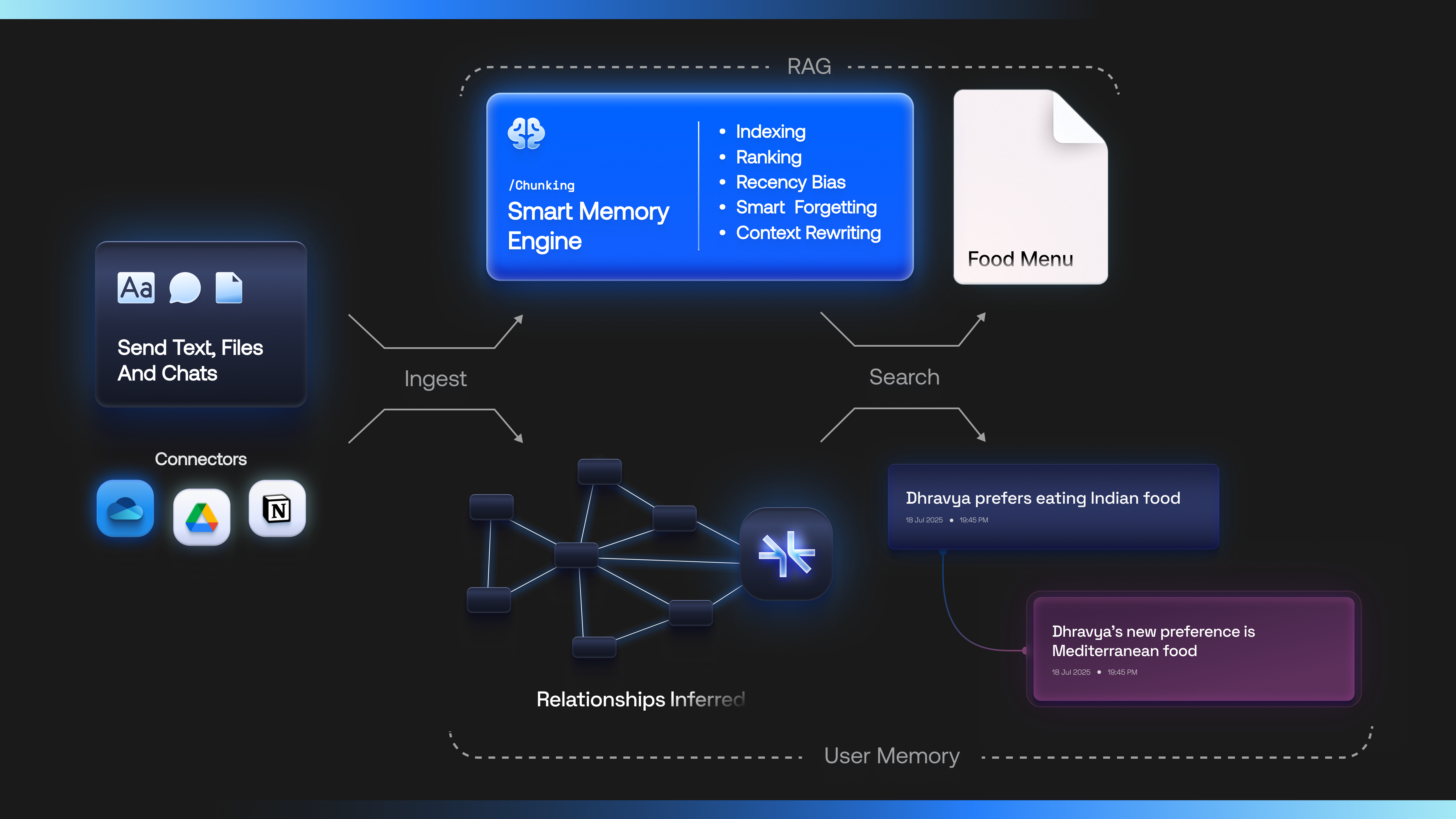 * You send Supermemory raw data in any format - text, files, and chats, or connect it to the data sources
* Supermemory [intelligently indexes them](/docs/concepts/how-it-works) using our user understanding model and builds a semantic understanding graph on top of an entity (e.g., a user, a document, a project, an organization). We call these entities `containerTag`
* This knowledge is now traversed by the agent, and an automatic profile is built for it. The agent may now use it for memory operations or for retrieval.
## Why add memory to your agent?
Without memory, every session starts from zero. The model cannot know what the user preferred last week, which project they are on, or that a fact has changed since yesterday.
**Memory** gives an agent durable understanding of *people and entities over time* — preferences, decisions, relationships, corrections. **Retrieval (RAG)** grounds answers in *documents and knowledge bases*. You usually want both.
By adding memory to your agent, you can:
* **Personalize** — remember preferences, roles, and history across sessions without stuffing the full chat log into every prompt
* **Stay correct as facts change** — “I love Adidas” then “switching to Puma” should not leave both preferences equally true
* **Ground answers** — pull the right policy, ticket, or doc when the question needs source material
* **Ship multi-tenant products** — isolate each user or workspace so one customer’s memory never leaks into another’s
You can think of memory as the always-on context a skilled teammate would carry — not a search box over raw logs.
For the full category argument (vs DIY vectors, thin memory wrappers, pure RAG), see [Comparison](/docs/overview/comparison) and [Memory vs RAG](/docs/concepts/memory-vs-rag).
## Why Supermemory?
* **State of the art on long-horizon memory** — #1 on [LongMemEval](https://supermemory.ai/research), [LoCoMo](https://supermemory.ai/research), and [ConvoMem](https://supermemory.ai/research), plus independent benches like [SWEContext](https://arxiv.org/pdf/2602.08316)
* **Memory is a graph, not a blob store** — facts [update, connect, and forget](/docs/concepts/graph-memory) in real time; not nearest-neighbor chunks alone
* **User profiles built in** — static + dynamic context the agent should [always know](/docs/concepts/user-profiles), \~ready for the prompt
* **Memory + SuperRAG in one engine** — personalize *and* ground on the same `containerTag` / context pool
* **Every door, one store** — API, [MCP](/docs/supermemory-mcp/mcp), plugins, [SMFS](/docs/smfs/overview), connectors, and Company Brain share the same memories
* **Multimodal by default** — text, chats, PDFs, images, video, code via [extractors](/docs/concepts/content-types) and [connectors](/docs/connectors/overview)
* **Run it your way** — managed cloud or [self-host](/docs/self-hosting/overview) as a single binary (including offline)
* You send Supermemory raw data in any format - text, files, and chats, or connect it to the data sources
* Supermemory [intelligently indexes them](/docs/concepts/how-it-works) using our user understanding model and builds a semantic understanding graph on top of an entity (e.g., a user, a document, a project, an organization). We call these entities `containerTag`
* This knowledge is now traversed by the agent, and an automatic profile is built for it. The agent may now use it for memory operations or for retrieval.
## Why add memory to your agent?
Without memory, every session starts from zero. The model cannot know what the user preferred last week, which project they are on, or that a fact has changed since yesterday.
**Memory** gives an agent durable understanding of *people and entities over time* — preferences, decisions, relationships, corrections. **Retrieval (RAG)** grounds answers in *documents and knowledge bases*. You usually want both.
By adding memory to your agent, you can:
* **Personalize** — remember preferences, roles, and history across sessions without stuffing the full chat log into every prompt
* **Stay correct as facts change** — “I love Adidas” then “switching to Puma” should not leave both preferences equally true
* **Ground answers** — pull the right policy, ticket, or doc when the question needs source material
* **Ship multi-tenant products** — isolate each user or workspace so one customer’s memory never leaks into another’s
You can think of memory as the always-on context a skilled teammate would carry — not a search box over raw logs.
For the full category argument (vs DIY vectors, thin memory wrappers, pure RAG), see [Comparison](/docs/overview/comparison) and [Memory vs RAG](/docs/concepts/memory-vs-rag).
## Why Supermemory?
* **State of the art on long-horizon memory** — #1 on [LongMemEval](https://supermemory.ai/research), [LoCoMo](https://supermemory.ai/research), and [ConvoMem](https://supermemory.ai/research), plus independent benches like [SWEContext](https://arxiv.org/pdf/2602.08316)
* **Memory is a graph, not a blob store** — facts [update, connect, and forget](/docs/concepts/graph-memory) in real time; not nearest-neighbor chunks alone
* **User profiles built in** — static + dynamic context the agent should [always know](/docs/concepts/user-profiles), \~ready for the prompt
* **Memory + SuperRAG in one engine** — personalize *and* ground on the same `containerTag` / context pool
* **Every door, one store** — API, [MCP](/docs/supermemory-mcp/mcp), plugins, [SMFS](/docs/smfs/overview), connectors, and Company Brain share the same memories
* **Multimodal by default** — text, chats, PDFs, images, video, code via [extractors](/docs/concepts/content-types) and [connectors](/docs/connectors/overview)
* **Run it your way** — managed cloud or [self-host](/docs/self-hosting/overview) as a single binary (including offline)
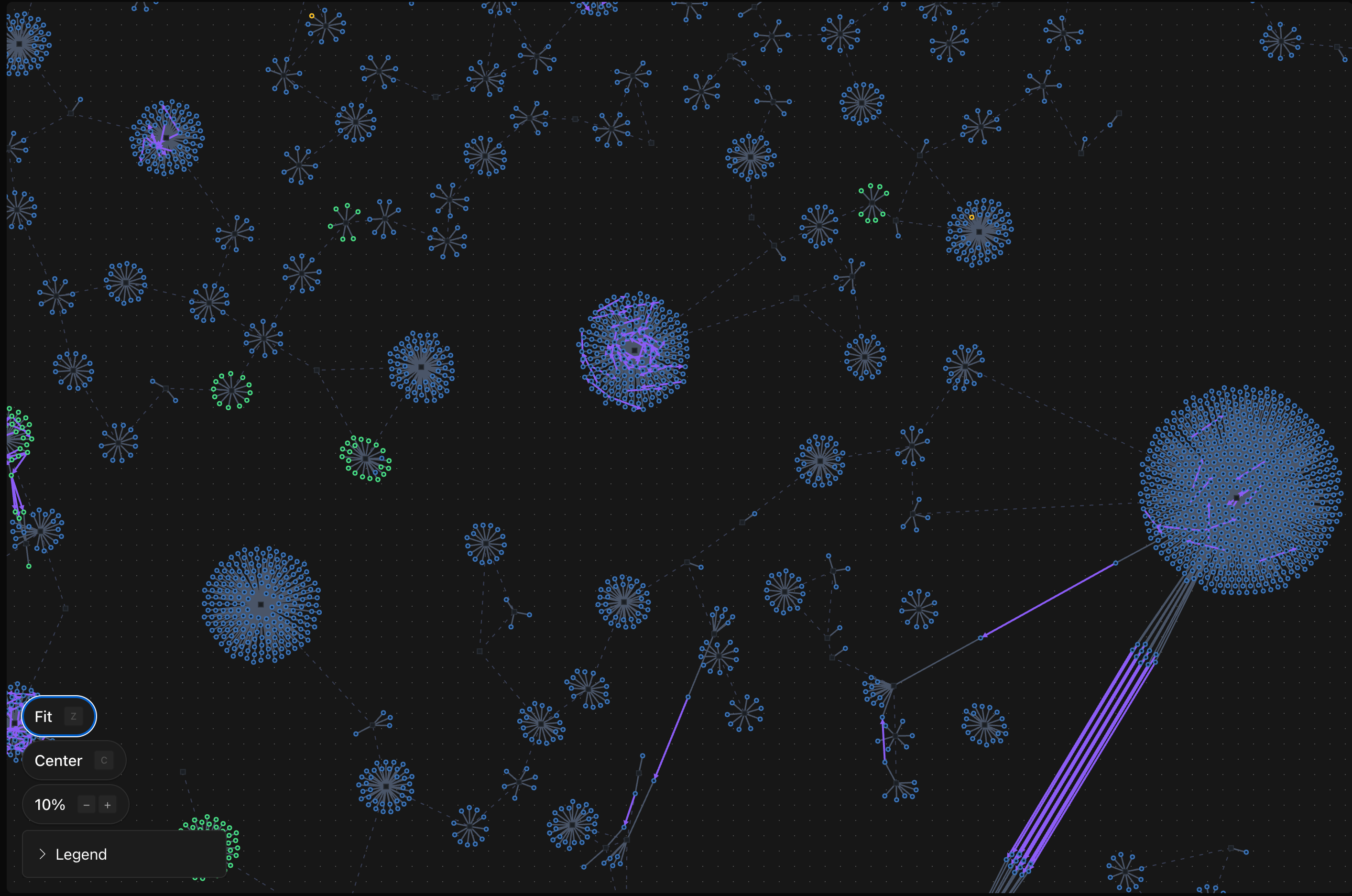 Memory, profiles, and SuperRAG share the **same context pool** when you use the same isolation (`containerTag`). Mix and match for your product! A container can be anything - a user, a project, team, organization, etc.
## Next steps
Make your first API call in minutes
Understand the knowledge graph architecture
vs DIY vectors, thin memory layers, pure RAG
One binary, zero config, fully offline
Credits, SM tokens, and how usage works
SOC 2, GDPR, HIPAA BAA, encryption
Memory, profiles, and SuperRAG share the **same context pool** when you use the same isolation (`containerTag`). Mix and match for your product! A container can be anything - a user, a project, team, organization, etc.
## Next steps
Make your first API call in minutes
Understand the knowledge graph architecture
vs DIY vectors, thin memory layers, pure RAG
One binary, zero config, fully offline
Credits, SM tokens, and how usage works
SOC 2, GDPR, HIPAA BAA, encryption